Google Ads conversion tracking for Shopify: the complete setup guide

How to set up Google Ads conversion tracking on Shopify, why it drives Smart Bidding, and how server-side tracking with Enhanced Conversions closes the data gap.
July 24, 2026
Frank de Vos
Google Ads conversion tracking: every Shopify sale captured server-side feeds Smart Bidding
Latest
Google Ads

Google Ads conversion tracking for Shopify: the complete setup guide

Google Ads conversion tracking: every Shopify sale captured server-side feeds Smart Bidding

Short answer:

Google Ads conversion tracking tells Google which clicks turned into sales, so its bidding can optimise toward revenue instead of guessing. On Shopify you set it up with a conversion action and the Google tag, then feed it purchase and lead events. The catch is accuracy: browser-based tracking misses 30% to 60% of conversions, so the real upgrade is server-side tracking with Enhanced Conversions, which enriches it with first-party data and closes the gap.

If you run Google Ads for a Shopify store, conversion tracking is the wiring that makes everything else work. Get it right and Google can see which campaigns actually make you money. Get it wrong and you are paying Google to optimise toward a number that does not reflect reality.

Most guides stop at "install the tag." That gets you basic tracking, but it is also where most of the data loss begins. This guide covers the full setup on Shopify, and then the part that actually decides your results: how accurate that tracking is.

Closing that accuracy gap is what TrackBee is built for. It captures your conversions server-side and enriches it with first-party data, so Google sees the sales the browser tag misses.

What is Google Ads conversion tracking?

Google Ads conversion tracking is the system that connects an ad click to what the shopper did afterwards, like a purchase, a sign-up or an add to cart. It works by recording a conversion action when someone completes that step, then tying it back to the campaign, ad group and keyword that brought them in.

Without it, Google only knows it delivered clicks. With it, Google knows which of those clicks became revenue, which is the input its bidding needs to spend your budget well.

Why conversion tracking makes or breaks your campaigns

Modern Google Ads runs on Smart Bidding: automated strategies like Target ROAS and Maximize Conversions. These are machine learning systems, and they learn from the conversions you report back.

Feed them complete, accurate conversions and they find more of your best customers. Feed them partial data, and they optimise toward a distorted picture, bidding too little on what works and too much on what does not. Conversion tracking is not a reporting feature you set once and forget. It is the training data for how your budget gets spent every day.

How to set up Google Ads conversion tracking on Shopify

The standard setup has a few steps:

  1. Create a conversion action. In Google Ads, under Goals, create a conversion action for Purchase (and any secondary actions you care about, like Begin Checkout or Sign-up). Set the value and counting rules.

  2. Install the Google tag. Add the Google tag to your store so it can record those actions. On Shopify this can go in through the native Google & YouTube channel, Google Tag Manager, or your tracking app.

  3. Send the purchase event with a value. Make sure the purchase fires on the thank-you page with the real order value and currency, so Google optimises toward revenue, not just order counts.

  4. Connect GA4 if you use it. Many stores also import conversions from GA4 through the Measurement Protocol. Keep your source of truth clear so you do not double-count.

  5. Verify. Run a test purchase and confirm the conversion appears in Google Ads with the right value.

That gets you working conversion tracking. It is also where the real problem starts.

The accuracy problem: why your numbers are off

Basic conversion tracking runs in the browser, and the browser is a leaky place to measure:
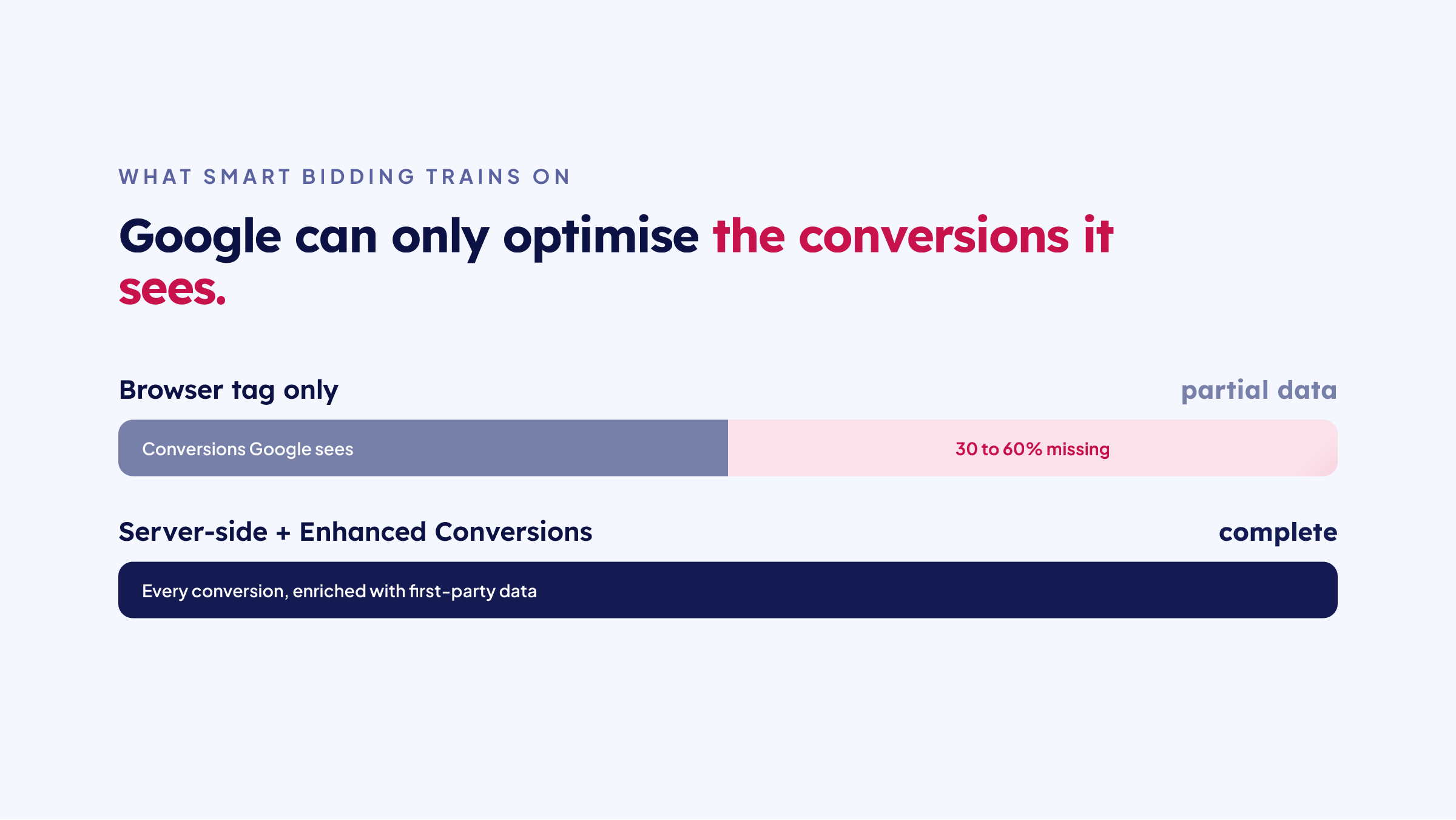
Browser tag only misses 30 to 60% of conversions; server-side with Enhanced Conversions is complete
  • Ad blockers stop the tag from firing for a large share of visitors.

  • iOS restrictions and Safari's cookie limits break the link between a click and a later purchase.

  • Consent Mode v2 means visitors who decline are not measured the standard way, and non-compliant setups lose even more.

Stacked together, this is why a browser-only setup misses 30% to 60% of conversions. The sales still happen. Google just never hears about them, so Smart Bidding trains on a shrunken, skewed version of your results.

Enhanced Conversions and server-side tracking: the upgrade

Google's own answer to part of this is Enhanced Conversions: sending hashed first-party data (email, name, address) alongside the conversion so Google can match it even when cookies fail. It is a real improvement, and worth doing. See our Google Enhanced Conversions setup guide and the ultimate guide to Enhanced Conversions.

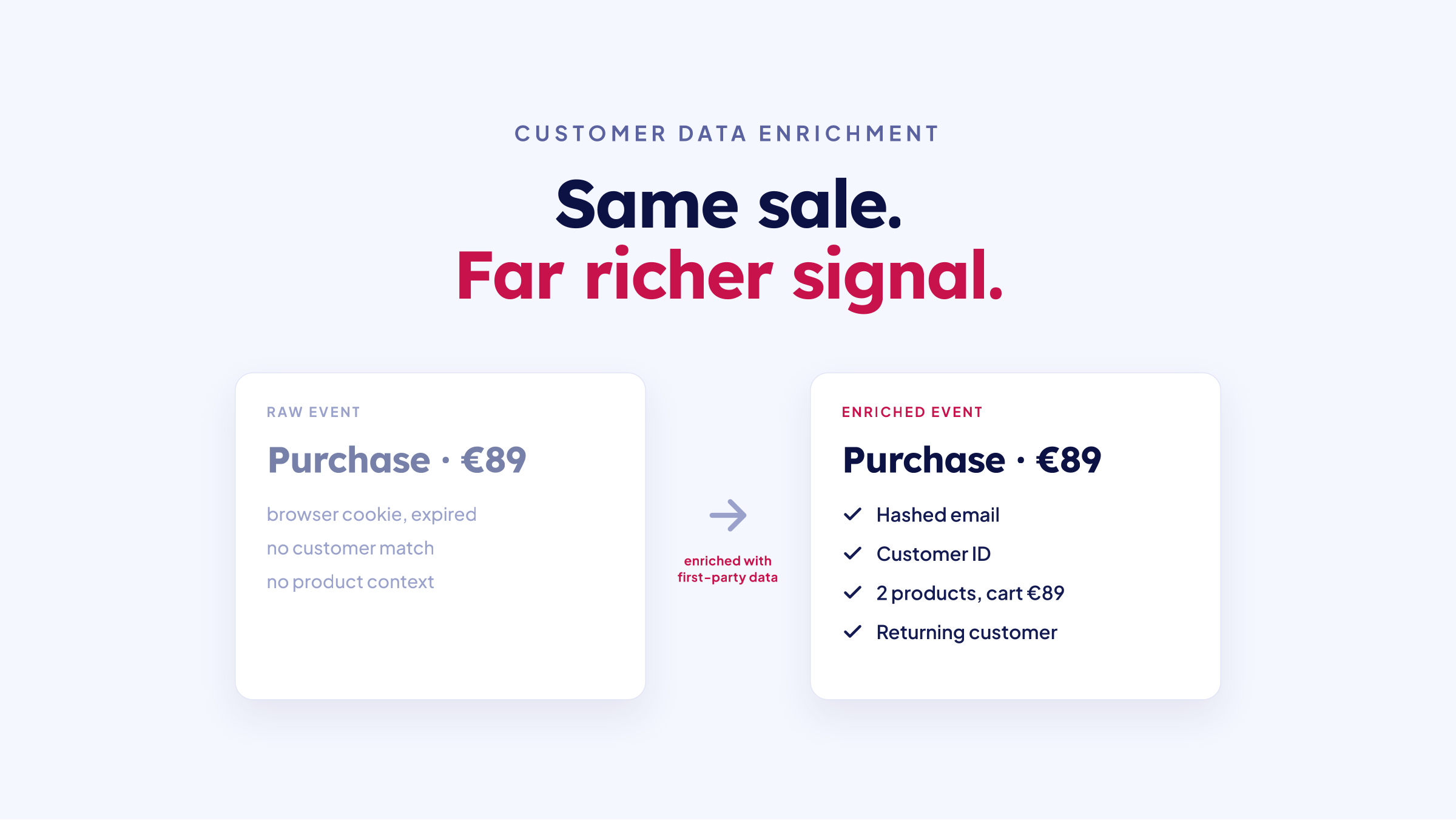
But Enhanced Conversions still depends on the browser tag firing in the first place. If an ad blocker kills the tag, there is nothing to enhance. That is why the fuller fix is server-side tracking: capturing the conversion on your server, where it does not depend on the browser, then enriching it with first-party data before sending it to Google. You get both the missing events and the better matching.

How TrackBee makes Google Ads conversion tracking accurate

TrackBee runs your Google Ads conversion tracking server-side on Shopify, alongside your existing tag:

  1. It captures the purchase on the server, straight from Shopify's order data, so ad blockers and iOS limits cannot drop it.

  2. It enriches it with first-party data, so Google can match the conversion to a real person, the way Enhanced Conversions is meant to work.

  3. It sends clean, deduplicated conversions, so nothing is counted twice when both the browser tag and the server fire.

  4. It respects consent, sending the right signals so your setup stays compliant with Consent Mode v2.

The result is conversion data that reflects your actual sales, which is exactly what Smart Bidding needs. For the Google-specific mechanics, see TrackBee's Conversion Booster for Google Ads.

Frequently asked questions

What is the difference between Google Ads conversion tracking and GA4? Conversion tracking in Google Ads is built to feed bidding: it tells Google which clicks led to revenue so it can optimise. GA4 is an analytics tool for understanding behaviour across your site. They can share data, but they serve different jobs, and you should be clear on which is your source of truth for conversions.

Do I still need the Google tag if I use server-side tracking? Usually you run both. The browser tag keeps working where it can, server-side tracking catches what the browser misses, and deduplication makes sure a sale is only counted once.

Will server-side tracking double-count my conversions? Not with deduplication. TrackBee matches events caught by both the browser and the server and sends each conversion to Google exactly once.

Is Enhanced Conversions enough on its own? It helps, but it still relies on the browser tag firing. Pairing it with server-side capture is what closes the gap, because the conversion is recorded even when the browser tag never runs.

How long until better data improves performance? Data usually looks more complete within a day or two of getting server-side tracking live. Campaign performance tends to improve over the following two to four weeks as Smart Bidding retrains on the fuller data.

In this article
Boost Your Revenue
Track Missing Conversion Data
Lorem Ipsum

Boost Your Revenue

Track & Enrich
Missing Conversion Data

Try for free
Share this:

Short answer:

Google Ads conversion tracking tells Google which clicks turned into sales, so its bidding can optimise toward revenue instead of guessing. On Shopify you set it up with a conversion action and the Google tag, then feed it purchase and lead events. The catch is accuracy: browser-based tracking misses 30% to 60% of conversions, so the real upgrade is server-side tracking with Enhanced Conversions, which enriches it with first-party data and closes the gap.

If you run Google Ads for a Shopify store, conversion tracking is the wiring that makes everything else work. Get it right and Google can see which campaigns actually make you money. Get it wrong and you are paying Google to optimise toward a number that does not reflect reality.

Most guides stop at "install the tag." That gets you basic tracking, but it is also where most of the data loss begins. This guide covers the full setup on Shopify, and then the part that actually decides your results: how accurate that tracking is.

Closing that accuracy gap is what TrackBee is built for. It captures your conversions server-side and enriches it with first-party data, so Google sees the sales the browser tag misses.

What is Google Ads conversion tracking?

Google Ads conversion tracking is the system that connects an ad click to what the shopper did afterwards, like a purchase, a sign-up or an add to cart. It works by recording a conversion action when someone completes that step, then tying it back to the campaign, ad group and keyword that brought them in.

Without it, Google only knows it delivered clicks. With it, Google knows which of those clicks became revenue, which is the input its bidding needs to spend your budget well.

Why conversion tracking makes or breaks your campaigns

Modern Google Ads runs on Smart Bidding: automated strategies like Target ROAS and Maximize Conversions. These are machine learning systems, and they learn from the conversions you report back.

Feed them complete, accurate conversions and they find more of your best customers. Feed them partial data, and they optimise toward a distorted picture, bidding too little on what works and too much on what does not. Conversion tracking is not a reporting feature you set once and forget. It is the training data for how your budget gets spent every day.

How to set up Google Ads conversion tracking on Shopify

The standard setup has a few steps:

  1. Create a conversion action. In Google Ads, under Goals, create a conversion action for Purchase (and any secondary actions you care about, like Begin Checkout or Sign-up). Set the value and counting rules.

  2. Install the Google tag. Add the Google tag to your store so it can record those actions. On Shopify this can go in through the native Google & YouTube channel, Google Tag Manager, or your tracking app.

  3. Send the purchase event with a value. Make sure the purchase fires on the thank-you page with the real order value and currency, so Google optimises toward revenue, not just order counts.

  4. Connect GA4 if you use it. Many stores also import conversions from GA4 through the Measurement Protocol. Keep your source of truth clear so you do not double-count.

  5. Verify. Run a test purchase and confirm the conversion appears in Google Ads with the right value.

That gets you working conversion tracking. It is also where the real problem starts.

The accuracy problem: why your numbers are off

Basic conversion tracking runs in the browser, and the browser is a leaky place to measure:

Browser tag only misses 30 to 60% of conversions; server-side with Enhanced Conversions is complete
  • Ad blockers stop the tag from firing for a large share of visitors.

  • iOS restrictions and Safari's cookie limits break the link between a click and a later purchase.

  • Consent Mode v2 means visitors who decline are not measured the standard way, and non-compliant setups lose even more.

Stacked together, this is why a browser-only setup misses 30% to 60% of conversions. The sales still happen. Google just never hears about them, so Smart Bidding trains on a shrunken, skewed version of your results.

Enhanced Conversions and server-side tracking: the upgrade

Google's own answer to part of this is Enhanced Conversions: sending hashed first-party data (email, name, address) alongside the conversion so Google can match it even when cookies fail. It is a real improvement, and worth doing. See our Google Enhanced Conversions setup guide and the ultimate guide to Enhanced Conversions.

But Enhanced Conversions still depends on the browser tag firing in the first place. If an ad blocker kills the tag, there is nothing to enhance. That is why the fuller fix is server-side tracking: capturing the conversion on your server, where it does not depend on the browser, then enriching it with first-party data before sending it to Google. You get both the missing events and the better matching.

How TrackBee makes Google Ads conversion tracking accurate

TrackBee runs your Google Ads conversion tracking server-side on Shopify, alongside your existing tag:

  1. It captures the purchase on the server, straight from Shopify's order data, so ad blockers and iOS limits cannot drop it.

  2. It enriches it with first-party data, so Google can match the conversion to a real person, the way Enhanced Conversions is meant to work.

  3. It sends clean, deduplicated conversions, so nothing is counted twice when both the browser tag and the server fire.

  4. It respects consent, sending the right signals so your setup stays compliant with Consent Mode v2.

The result is conversion data that reflects your actual sales, which is exactly what Smart Bidding needs. For the Google-specific mechanics, see TrackBee's Conversion Booster for Google Ads.

Frequently asked questions

What is the difference between Google Ads conversion tracking and GA4? Conversion tracking in Google Ads is built to feed bidding: it tells Google which clicks led to revenue so it can optimise. GA4 is an analytics tool for understanding behaviour across your site. They can share data, but they serve different jobs, and you should be clear on which is your source of truth for conversions.

Do I still need the Google tag if I use server-side tracking? Usually you run both. The browser tag keeps working where it can, server-side tracking catches what the browser misses, and deduplication makes sure a sale is only counted once.

Will server-side tracking double-count my conversions? Not with deduplication. TrackBee matches events caught by both the browser and the server and sends each conversion to Google exactly once.

Is Enhanced Conversions enough on its own? It helps, but it still relies on the browser tag firing. Pairing it with server-side capture is what closes the gap, because the conversion is recorded even when the browser tag never runs.

How long until better data improves performance? Data usually looks more complete within a day or two of getting server-side tracking live. Campaign performance tends to improve over the following two to four weeks as Smart Bidding retrains on the fuller data.

Latest

Discover other Blogs

Explore our collection of informative and engaging blog posts.

Customer data enrichment: a raw purchase event versus an enriched event with first-party data
Frank de Vos
Frank de Vos
7
min read
Cookieless tracking for Shopify: server-side tracking keeps your data when third-party cookies are blocked
Frank de Vos
Frank de Vos
8
min read
Ecommerce metrics dashboard showing revenue, MER (blended ROAS), CAC and new customers
Frank de Vos
Frank de Vos
6
min read