
Is your Meta ad fatigued, or is it a tracking gap?

A creative that carried your account for a month starts to slip. Before you cut it, make sure it is really tired, and not just an audience wearing out or sales the pixel stopped counting. Here is how to read creative fatigue properly.

July 7, 2026
Frank de Vos
A stack of ad creative cards in brand colors with the worn, faded, dog-eared card on top, showing one fatigued ad and fresh replacements waiting behind it.
Latest
TrackBee Insights

Is your Meta ad fatigued, or is it a tracking gap?

A stack of ad creative cards in brand colors with the worn, faded, dog-eared card on top, showing one fatigued ad and fresh replacements waiting behind it.

Short answer: Creative fatigue is when one specific ad has been seen so often that it stops working, while your audience and offer are still fine. You spot it when a single creative's CTR slides and its cost per result creeps up over its life, even though other ads in the same audience hold steady. But before you kill it, rule out the cheaper explanation: the ad may be fine and simply under-reported, because browser pixels miss a large share of conversions. The fastest way to get a clear read is the /audit-creatives prompt in TrackBee Insights, which scores each creative against real, server-side sales and tells you what to scale, hold, or refresh.

A creative that carried your account for a month starts to slip. The instinct is to call it fatigue and cut it. Sometimes that is right. Often it is not, either because the drop is really the audience wearing out, or because the sales are still happening and your pixel just stopped counting them. This guide shows you how to read creative fatigue properly, and how to avoid killing a winner by mistake.

Do it in one prompt instead

Connect TrackBee Insights to Claude or ChatGPT and see which creatives to scale, hold, or refresh, scored against real sales:

/audit-creatives  Try TrackBee Insights free →

What creative fatigue actually is

Creative fatigue is the ad wearing out, not the audience. The same people have seen this exact image or video enough times that it no longer stops the scroll. They have processed it, so they skip it, and the numbers on that one ad slide while the rest of the account holds.

The key word is one. Fatigue lives at the level of a single creative. If everything in an audience is softening together, that is audience saturation, which is a different problem with a different fix. We cover that in how to spot audience saturation before your ROAS crashes. Here we are talking about the single ad that used to win and no longer does.

The signs of a fatiguing creative

Look at one creative over its own lifetime, and watch these move together. Treat the numbers as rules of thumb, not hard limits, and read them against how the ad started.

SignalRoughly healthyFatigue warning
CTR over the ad's lifeHolds or improvesSliding week over week on this ad only
Frequency on the adUnder about 2 to 3Climbing past about 3.5 and still rising
Cost per result on the adStableCreeping up while other ads hold
Early engagement (thumbstop, hold)SteadyDropping as the ad ages

The pattern that means fatigue: this ad's CTR is falling and its cost per result is rising, its frequency is high, and the ads next to it in the same audience are still fine. That last part is what separates fatigue from a wider problem.

Fatigue or saturation? A quick test

These two get mixed up constantly, and the fix for each is the opposite, so it is worth ten seconds to check.

  • If one creative is sliding while others in the same audience hold up, it is creative fatigue. The fix is a new ad.

  • If every creative aimed at one audience is softening together while those same ads do fine elsewhere, it is audience saturation. The fix is a fresh audience, not a fresh ad.

Get this wrong and you will pump out new creatives for an audience that has simply run out of new people, or keep flogging a worn-out ad at an audience that is still fresh.

The trap: is it fatigue, or a tracking gap?

Here is the mistake that quietly kills winners. Before you retire a creative because its ROAS dropped, check that the sales actually stopped, and did not just stop being counted.

The ROAS you see on an ad is only as complete as the conversions your pixel caught, and browser pixels miss a large share of sales, commonly estimated at 30 to 60 percent. Between ad blockers (around 30 percent of internet users run one, GWI via DataReportal), iOS privacy (only about half of users opt in to tracking, AppsFlyer), and consent banners, a creative can look like it is dying when it is actually still selling. That is phantom fatigue: the ad is fine, the measurement is not.

So the first move when a creative dips is not to kill it, it is to confirm the drop is real against sales that actually happened. If you have not checked your tracking lately, start with how to check if your Shopify conversion tracking is working. Fix the measurement, then judge the creative.

The manual way, and why it is slow

You can track this by hand. In Meta Ads Manager, break your ads down by creative, add CTR, frequency, and cost per result, then set the date range to compare this week against the ad's earlier weeks and look for the decline. Then repeat for every ad, and again next week, and cross-check against Shopify to see whether the sales really fell.

It works, but it is slow, it only sees platform-reported conversions, and by the time the trend is obvious in the headline numbers you have usually already overpaid. Most people check creative one ad at a time, after performance has already dropped.

The one-line version: ask TrackBee Insights

Instead of building that breakdown every week, you can ask for it. TrackBee Insights connects your TrackBee data to Claude or ChatGPT, so you ask in plain language and get an answer from your real, server-side sales across Meta and Google. To audit your creatives, you type one prompt:

/audit-creatives
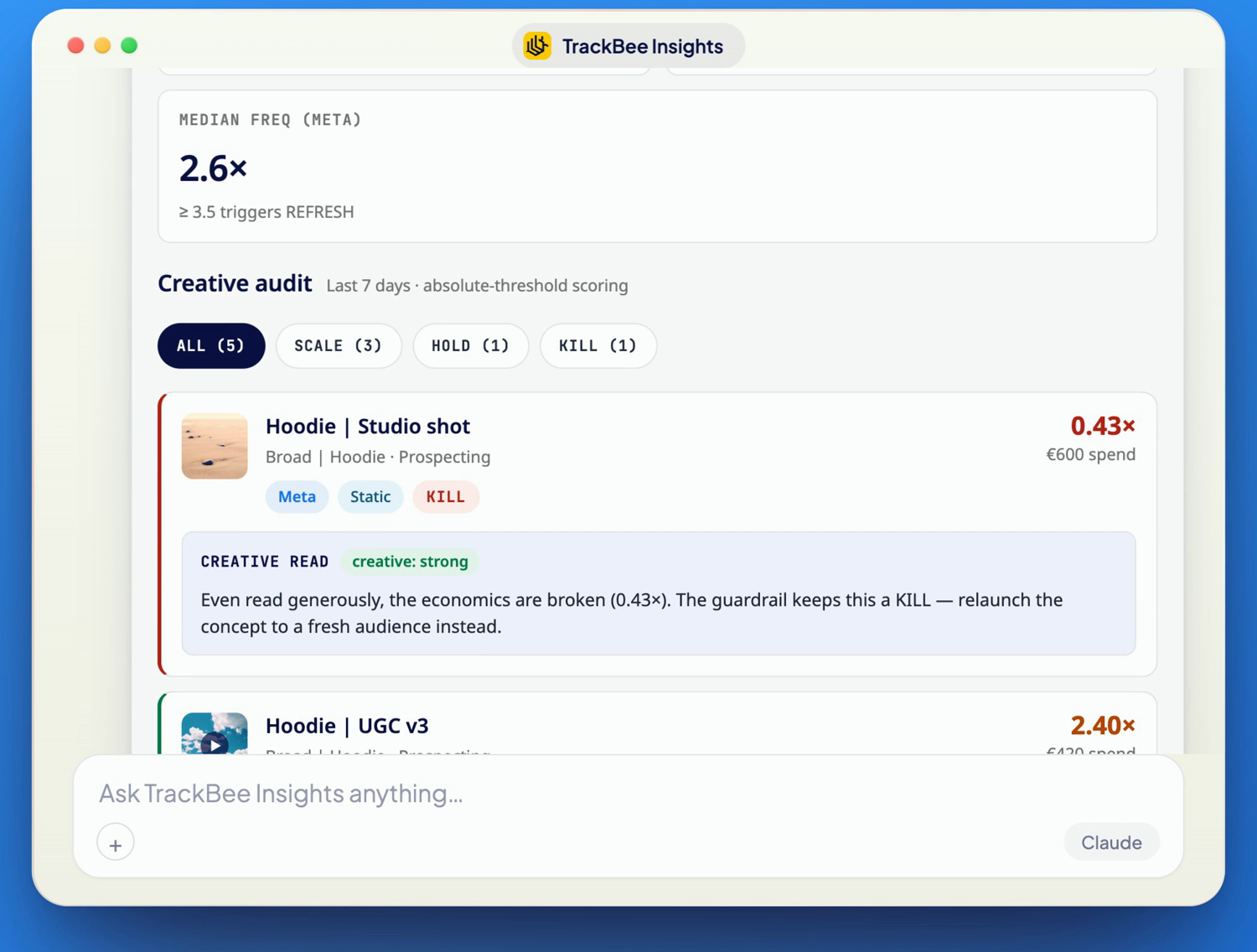
TrackBee Insights answering the audit-creatives prompt: a median frequency guardrail, and a creative audit scoring each ad scale, hold or kill, with one worn-out creative flagged to retire.

It scores every active creative against real sales, flags the ones to scale, hold, or refresh, and calls out the frequency guardrail so you can see which ads are being shown too often. Because it reads server-side conversions, it separates a genuinely fatigued creative from one that is still selling but under-counted, and it ends with production notes on which angles to make more of next. Run it once a week and you retire the truly tired ads while there is still budget to redirect.

What to do about a fatiguing creative

Once you have confirmed a creative is genuinely tired, the fixes are about the ad, not the audience:

  • Refresh the hook. The first two seconds do most of the work. A new opening on the same concept often revives a proven winner.

  • Change the format. Turn a static into a video, a talking head into UGC, or a single image into a carousel. Same message, new packaging.

  • Test a new angle. Keep the product, change the story: a different benefit, objection, or audience framing.

  • Retire, do not resurrect. Some creatives are simply spent. Retire the concept and relaunch to a fresh audience rather than pushing a dead ad harder.

  • Feed your winners forward. Make more of what your best-performing angle has in common, rather than starting from scratch each time.

Judge creatives against real sales, not the pixel

Every decision above depends on trusting the number under the ad. TrackBee is server-side tracking for Shopify that sets up in minutes, no developer project required. It captures the conversions browser pixels miss, enriches it with first-party data, deduplicates events so nothing double-counts, and sends clean signals to Meta, Google, TikTok, Pinterest, and Klaviyo.

That is what lets Insights score a creative on sales that actually happened, so a winner that is merely under-reported does not get cut, and a genuinely tired one does not get propped up. The audit is only as honest as the tracking underneath it.

Frequently asked questions

How do I know if my Meta ad is fatigued? Look at one creative over its own life. If its CTR is sliding and its cost per result is rising while its frequency climbs, and other ads in the same audience are still fine, that ad is fatiguing. If every ad in the audience is dropping together, it is audience saturation instead.

What frequency means a creative is fatigued? There is no universal cap, but for prospecting many advertisers start to refresh when 7-day frequency climbs past about 3.5 and CTR is falling at the same time. Read it as a trend against how the ad started, not a fixed number.

Could my ad look fatigued when it is actually fine? Yes. Browser pixels miss roughly 30 to 60 percent of conversions, so a creative can look like its ROAS dropped when the sales are simply not being counted. Confirm the drop against server-side sales before you kill the ad.

How often should I audit my creatives? Once a week is a good cadence for active accounts, since fatigue builds gradually. A weekly TrackBee Insights audit flags the tired ones without the manual breakdown in Ads Manager.

What is the difference between creative fatigue and audience saturation? Creative fatigue is one ad wearing out while the audience is fine, so you refresh the ad. Audience saturation is the audience wearing out while the ads are fine, so you find fresh people. Checking whether one ad or the whole audience is dropping tells you which one you have.

→ Try TrackBee Insights free and audit your creatives in one prompt. Or book a free demo and we will look at your account together.

Read next: Audience saturation on Meta ads: how to spot it before your ROAS crashes | How to check if your Shopify conversion tracking is working

In this article
Boost Your Revenue
Track Missing Conversion Data
Lorem Ipsum

Boost Your Revenue

Track & Enrich
Missing Conversion Data

Try for free
Share this:

Short answer: Creative fatigue is when one specific ad has been seen so often that it stops working, while your audience and offer are still fine. You spot it when a single creative's CTR slides and its cost per result creeps up over its life, even though other ads in the same audience hold steady. But before you kill it, rule out the cheaper explanation: the ad may be fine and simply under-reported, because browser pixels miss a large share of conversions. The fastest way to get a clear read is the /audit-creatives prompt in TrackBee Insights, which scores each creative against real, server-side sales and tells you what to scale, hold, or refresh.

A creative that carried your account for a month starts to slip. The instinct is to call it fatigue and cut it. Sometimes that is right. Often it is not, either because the drop is really the audience wearing out, or because the sales are still happening and your pixel just stopped counting them. This guide shows you how to read creative fatigue properly, and how to avoid killing a winner by mistake.

Do it in one prompt instead

Connect TrackBee Insights to Claude or ChatGPT and see which creatives to scale, hold, or refresh, scored against real sales:

/audit-creatives  Try TrackBee Insights free →

What creative fatigue actually is

Creative fatigue is the ad wearing out, not the audience. The same people have seen this exact image or video enough times that it no longer stops the scroll. They have processed it, so they skip it, and the numbers on that one ad slide while the rest of the account holds.

The key word is one. Fatigue lives at the level of a single creative. If everything in an audience is softening together, that is audience saturation, which is a different problem with a different fix. We cover that in how to spot audience saturation before your ROAS crashes. Here we are talking about the single ad that used to win and no longer does.

The signs of a fatiguing creative

Look at one creative over its own lifetime, and watch these move together. Treat the numbers as rules of thumb, not hard limits, and read them against how the ad started.

SignalRoughly healthyFatigue warning
CTR over the ad's lifeHolds or improvesSliding week over week on this ad only
Frequency on the adUnder about 2 to 3Climbing past about 3.5 and still rising
Cost per result on the adStableCreeping up while other ads hold
Early engagement (thumbstop, hold)SteadyDropping as the ad ages

The pattern that means fatigue: this ad's CTR is falling and its cost per result is rising, its frequency is high, and the ads next to it in the same audience are still fine. That last part is what separates fatigue from a wider problem.

Fatigue or saturation? A quick test

These two get mixed up constantly, and the fix for each is the opposite, so it is worth ten seconds to check.

  • If one creative is sliding while others in the same audience hold up, it is creative fatigue. The fix is a new ad.

  • If every creative aimed at one audience is softening together while those same ads do fine elsewhere, it is audience saturation. The fix is a fresh audience, not a fresh ad.

Get this wrong and you will pump out new creatives for an audience that has simply run out of new people, or keep flogging a worn-out ad at an audience that is still fresh.

The trap: is it fatigue, or a tracking gap?

Here is the mistake that quietly kills winners. Before you retire a creative because its ROAS dropped, check that the sales actually stopped, and did not just stop being counted.

The ROAS you see on an ad is only as complete as the conversions your pixel caught, and browser pixels miss a large share of sales, commonly estimated at 30 to 60 percent. Between ad blockers (around 30 percent of internet users run one, GWI via DataReportal), iOS privacy (only about half of users opt in to tracking, AppsFlyer), and consent banners, a creative can look like it is dying when it is actually still selling. That is phantom fatigue: the ad is fine, the measurement is not.

So the first move when a creative dips is not to kill it, it is to confirm the drop is real against sales that actually happened. If you have not checked your tracking lately, start with how to check if your Shopify conversion tracking is working. Fix the measurement, then judge the creative.

The manual way, and why it is slow

You can track this by hand. In Meta Ads Manager, break your ads down by creative, add CTR, frequency, and cost per result, then set the date range to compare this week against the ad's earlier weeks and look for the decline. Then repeat for every ad, and again next week, and cross-check against Shopify to see whether the sales really fell.

It works, but it is slow, it only sees platform-reported conversions, and by the time the trend is obvious in the headline numbers you have usually already overpaid. Most people check creative one ad at a time, after performance has already dropped.

The one-line version: ask TrackBee Insights

Instead of building that breakdown every week, you can ask for it. TrackBee Insights connects your TrackBee data to Claude or ChatGPT, so you ask in plain language and get an answer from your real, server-side sales across Meta and Google. To audit your creatives, you type one prompt:

/audit-creatives
TrackBee Insights answering the audit-creatives prompt: a median frequency guardrail, and a creative audit scoring each ad scale, hold or kill, with one worn-out creative flagged to retire.

It scores every active creative against real sales, flags the ones to scale, hold, or refresh, and calls out the frequency guardrail so you can see which ads are being shown too often. Because it reads server-side conversions, it separates a genuinely fatigued creative from one that is still selling but under-counted, and it ends with production notes on which angles to make more of next. Run it once a week and you retire the truly tired ads while there is still budget to redirect.

What to do about a fatiguing creative

Once you have confirmed a creative is genuinely tired, the fixes are about the ad, not the audience:

  • Refresh the hook. The first two seconds do most of the work. A new opening on the same concept often revives a proven winner.

  • Change the format. Turn a static into a video, a talking head into UGC, or a single image into a carousel. Same message, new packaging.

  • Test a new angle. Keep the product, change the story: a different benefit, objection, or audience framing.

  • Retire, do not resurrect. Some creatives are simply spent. Retire the concept and relaunch to a fresh audience rather than pushing a dead ad harder.

  • Feed your winners forward. Make more of what your best-performing angle has in common, rather than starting from scratch each time.

Judge creatives against real sales, not the pixel

Every decision above depends on trusting the number under the ad. TrackBee is server-side tracking for Shopify that sets up in minutes, no developer project required. It captures the conversions browser pixels miss, enriches it with first-party data, deduplicates events so nothing double-counts, and sends clean signals to Meta, Google, TikTok, Pinterest, and Klaviyo.

That is what lets Insights score a creative on sales that actually happened, so a winner that is merely under-reported does not get cut, and a genuinely tired one does not get propped up. The audit is only as honest as the tracking underneath it.

Frequently asked questions

How do I know if my Meta ad is fatigued? Look at one creative over its own life. If its CTR is sliding and its cost per result is rising while its frequency climbs, and other ads in the same audience are still fine, that ad is fatiguing. If every ad in the audience is dropping together, it is audience saturation instead.

What frequency means a creative is fatigued? There is no universal cap, but for prospecting many advertisers start to refresh when 7-day frequency climbs past about 3.5 and CTR is falling at the same time. Read it as a trend against how the ad started, not a fixed number.

Could my ad look fatigued when it is actually fine? Yes. Browser pixels miss roughly 30 to 60 percent of conversions, so a creative can look like its ROAS dropped when the sales are simply not being counted. Confirm the drop against server-side sales before you kill the ad.

How often should I audit my creatives? Once a week is a good cadence for active accounts, since fatigue builds gradually. A weekly TrackBee Insights audit flags the tired ones without the manual breakdown in Ads Manager.

What is the difference between creative fatigue and audience saturation? Creative fatigue is one ad wearing out while the audience is fine, so you refresh the ad. Audience saturation is the audience wearing out while the ads are fine, so you find fresh people. Checking whether one ad or the whole audience is dropping tells you which one you have.

→ Try TrackBee Insights free and audit your creatives in one prompt. Or book a free demo and we will look at your account together.

Read next: Audience saturation on Meta ads: how to spot it before your ROAS crashes | How to check if your Shopify conversion tracking is working

Latest

Discover other Blogs

Explore our collection of informative and engaging blog posts.

Three chunky clay icons on pedestals: a yellow up arrow for scale, a sky-blue pause for watch, and a navy down arrow for cut, the three weekly calls for an ad campaign.
Frank de Vos
Frank de Vos
7
min read
A matte clay globe with location pins standing on it, two bright and prominent and a few small and grey, showing that some advertising markets win while others underperform.
Frank de Vos
Frank de Vos
7
min read
A megaphone points at a crowd of clay figures; the ones nearest are bright and engaged, the ones further back have turned grey and worn out, showing an ad audience becoming saturated.
Frank de Vos
Frank de Vos
7
min read