

Short answer: Compare the conversions each ad platform reports against the orders Shopify actually recorded for the same window. A gap of 20 to 35 percent is normal and comes from view-through and modeled conversions. A platform reporting 2x or more of your Shopify orders usually means duplicate events. A platform reporting far fewer means lost signal: a misfiring pixel, a broken checkout event, or an expired connection. The fastest way to confirm it is to ask TrackBee Insights to run a tracking setup check across Meta, Google, TikTok, Pinterest, and Klaviyo at once.
For the full picture of how tracking should work on a Shopify store, see Shopify conversion tracking, done right.
You open Meta Ads Manager and it shows 142 purchases last week. You check Shopify and it shows 118 orders. Google Ads claims a different number again. So which one is right, and is any of this a sign that something is broken?
Most store owners never resolve this. They either trust the platform that flatters them most, or they assume their tracking is busted and start ripping things out. Both are expensive mistakes. The numbers almost never match by design, and the real skill is telling a healthy gap apart from a broken one.
This guide walks through the manual check, the thresholds that tell you what your gap means, and the faster way to run the same check in plain language.
Do it in one prompt instead
Connect TrackBee Insights to Claude or ChatGPT and check your tracking across Meta, Google, TikTok, Pinterest, and Klaviyo on your real server-side data:
/check-tracking-setup Try TrackBee Insights free →
Quick verdict: broken, or just different?
Before you touch anything, compare each platform's reported conversions to your Shopify orders for the same date range. Then read the gap against this table. This is the single most useful diagnostic you can run, and it takes about a minute.
| What you see | What it usually means | Action |
|---|---|---|
| Platform reports 20 to 35 percent more than Shopify | Normal. View-through and modeled conversions. | Nothing. This is healthy. |
| Platform reports roughly the same as Shopify | Normal to slightly under-counted. | Fine, but you may be losing signal. Worth improving. |
| Platform reports 2x or more than Shopify | Duplicate events. Browser and server-side both firing without deduplication. | Check your deduplication setup. |
| Platform reports far fewer than Shopify (under ~60 percent) | Lost signal. Misfiring pixel, broken checkout event, or a dropped connection. | Investigate. Something is leaking. |
| A platform suddenly drops to near zero | Broken connection. Expired token or disconnected pixel. | Reconnect the account. |
The rule of thumb: gaps caused by attribution method are normal and you should leave them alone. Gaps caused by data loss are fixable and cost you money every day they run.
How to check your Shopify conversion tracking by hand
If you want to verify it yourself, here is the full manual audit. It takes about ten to fifteen minutes per platform.
Step 1: Confirm the pixel and tag are firing
Install the Meta Pixel Helper browser extension and load your store. It should show your pixel firing PageView, ViewContent, and AddToCart events as you click through. Do the same with the Google Tag Assistant for your Google tag. If an event never fires, that event is not being tracked, full stop.
Then place a real test order. In Meta Events Manager, open Test Events and confirm a Purchase event arrives with a value and currency attached. In Google Ads, check that the conversion shows up under your conversion action within a few hours.
Step 2: Compare platform conversions to Shopify orders
Pull the same date range in each platform and in Shopify. Line up purchases or conversions against Shopify orders. Now you have your gap, and you can read it against the table above. Do this per platform, not blended, because one channel can be perfectly healthy while another is silently broken.
Step 3: Check for duplicate events
If a platform reports far more than Shopify, the usual culprit is the same event firing twice: once from the browser pixel and once server-side, without a shared event ID to match them. Proper event deduplication sends one event ID for both, so the platform counts it once. Without it, your numbers inflate and your bidding optimizes on phantom conversions.
Step 4: Check your connections haven't dropped
Tokens expire. Pinterest and TikTok connections have shorter lifespans than Meta and Google, and they fail quietly. A pixel that worked last month can be sending nothing today because someone lost admin access or a new pixel ID replaced the old one. If a channel went from healthy numbers to almost zero, this is almost always why.
What a normal gap looks like (and why it exists)
Here is the part most guides skip: even with perfect tracking, your numbers will not match. That is not a bug. Each platform measures a different thing.
Shopify counts completed checkouts. It is your financial source of truth.
Meta counts click-through conversions, plus view-through conversions (someone saw your ad, did not click, then bought elsewhere), plus modeled conversions it estimates when it cannot observe the sale directly.
Google counts conversions within its own attribution window, with its own modeling.
So a healthy Meta number sits 20 to 35 percent above Shopify with the default 7-day click plus 1-day view window. That excess is real influence, not fake data. The mistake is trying to force three platforms to agree on one number. They never will, and they are not supposed to.
The number that should worry you is the opposite one: when a platform reports fewer conversions than Shopify. That means real sales happened and the platform never heard about them. Every missed conversion is a sale your bidding algorithm cannot learn from.
Why browser pixels miss 30 to 60 percent of conversions
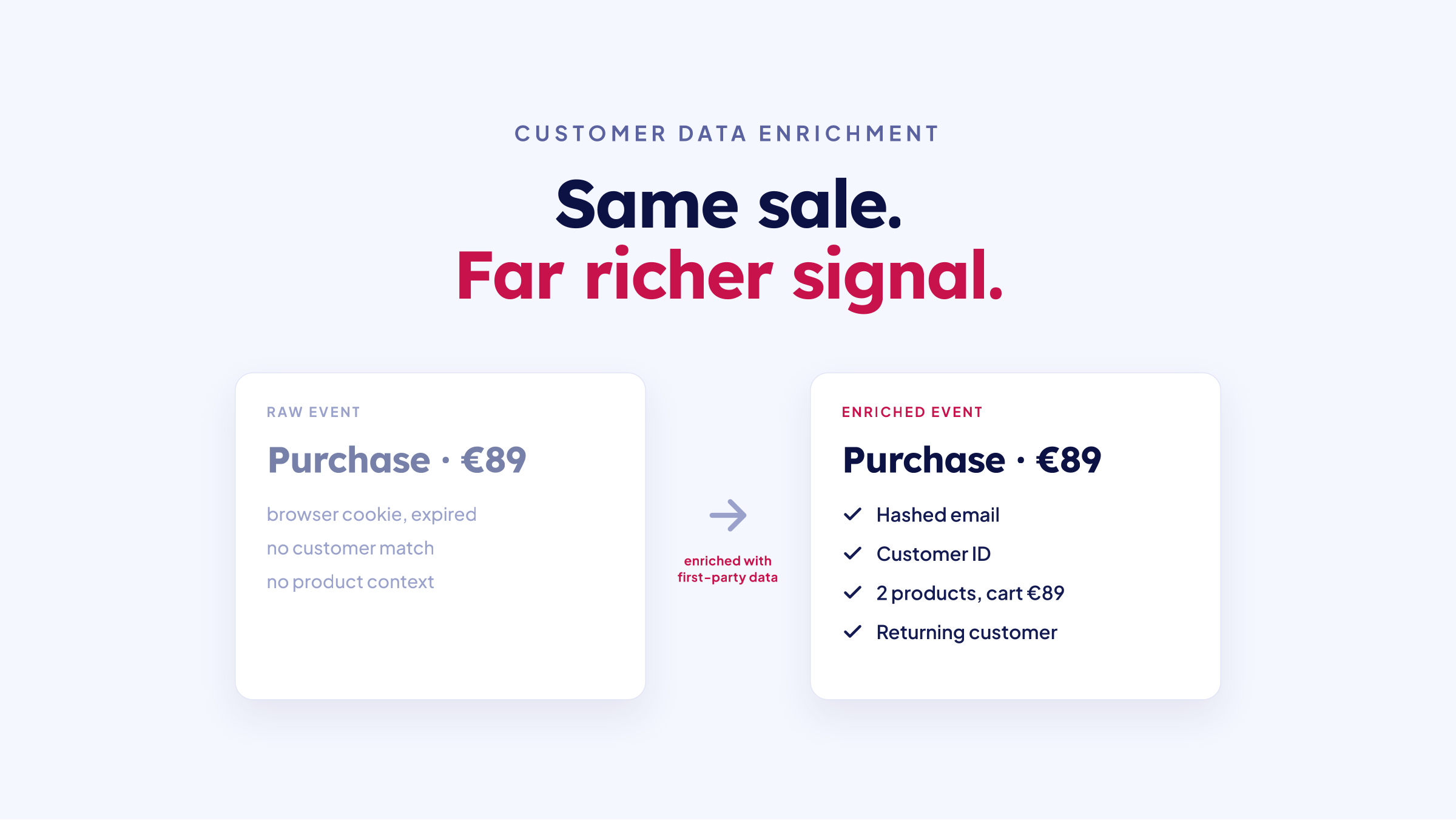
When a platform under-reports, the root cause is almost always the same. The browser pixel, the default way Shopify stores send conversion data, simply does not see a large share of your sales. Browser pixels miss roughly 30 to 60 percent of conversions, and the reasons stack up:
Ad blockers stop the pixel from loading at all, and around 30 percent of internet users run one (GWI via DataReportal).
iOS privacy (App Tracking Transparency) strips the identifiers that connect a sale back to an ad click, and only about half of users opt in to tracking (AppsFlyer).
Consent banners block the pixel until a shopper accepts, and many never do.
Cookie expiration and cross-device journeys break the trail between the click and the purchase.
This is why server-side tracking exists. Instead of relying on a script in the shopper's browser, conversions are captured on the server and sent directly to each platform through its Conversions API. Ad blockers and browser privacy settings cannot intercept it, and the platform receives first-party data it would otherwise never see.
If your manual check shows a platform reporting well under your Shopify orders, this is the gap you are looking at. It is fixable, and fixing it usually recovers a chunk of conversions you were already paying to generate.
The one-line version: ask TrackBee Insights to check it
The manual audit works, but it is slow, and you have to repeat it for every platform every time you suspect something. TrackBee Insights does the whole thing in one prompt.
TrackBee Insights connects your TrackBee data to Claude or ChatGPT. You ask a question in plain language and it answers from your real, server-side, cross-platform data. To check your tracking, you type one command:
/check-tracking-setup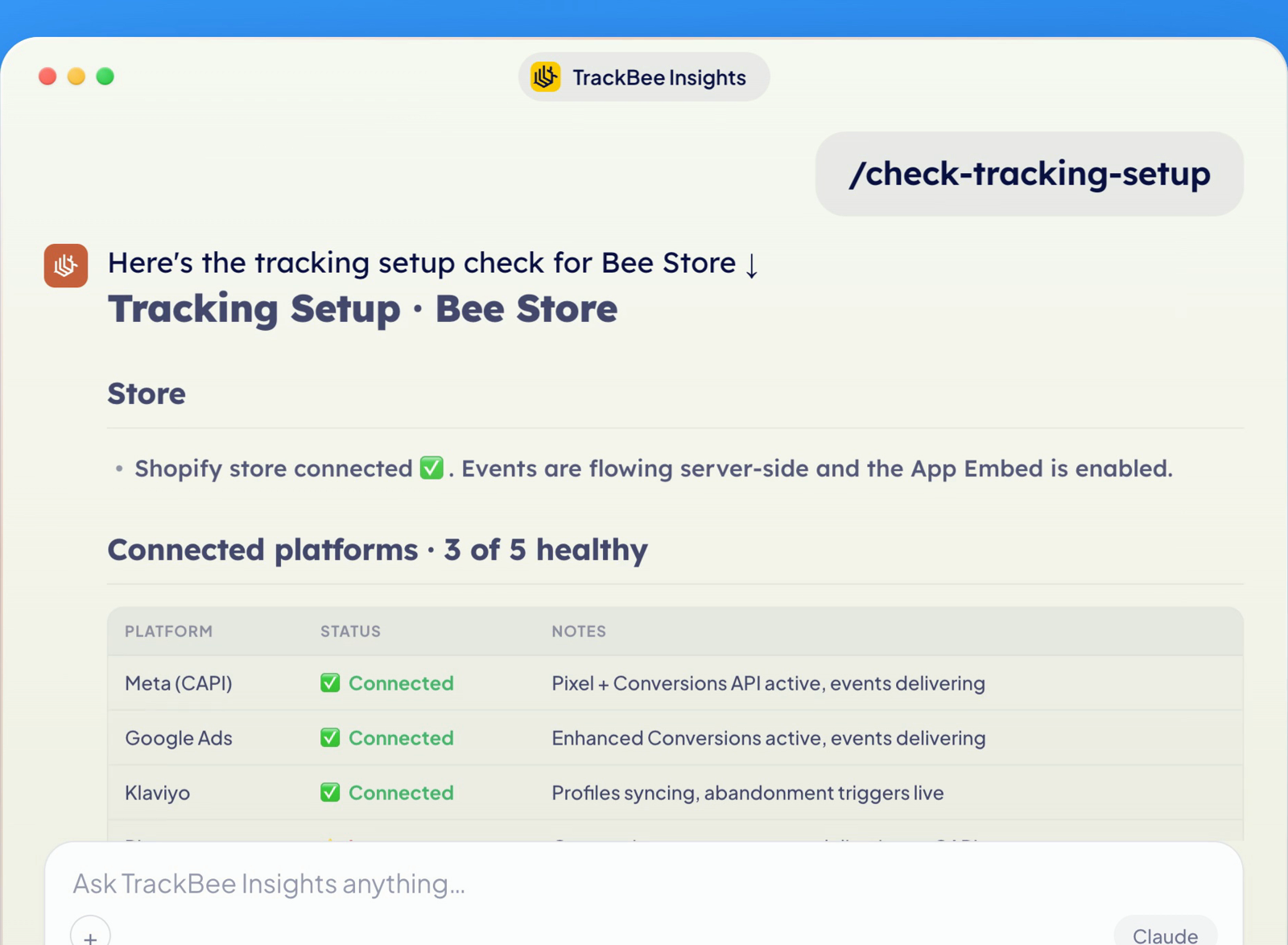
It returns a status report for every connected platform at once: Meta, Google, TikTok, Pinterest, and Klaviyo. For each one it tells you whether events are delivering, what is healthy, and what needs attention. No extensions to install, no test orders to place, no spreadsheets to reconcile. It reads the same data you would check by hand and gives you the verdict. Run it whenever you change your theme, checkout, or apps, and once a month otherwise, so you always know your tracking is still firing and set up correctly.
In the example above, three of five platforms are healthy and two have a problem. Which brings us to the useful part.
When something is off, it walks you through the fix
A status check that only tells you something is broken is half a tool. When Insights finds a problem, it explains the likely cause and offers to walk you through the fix.
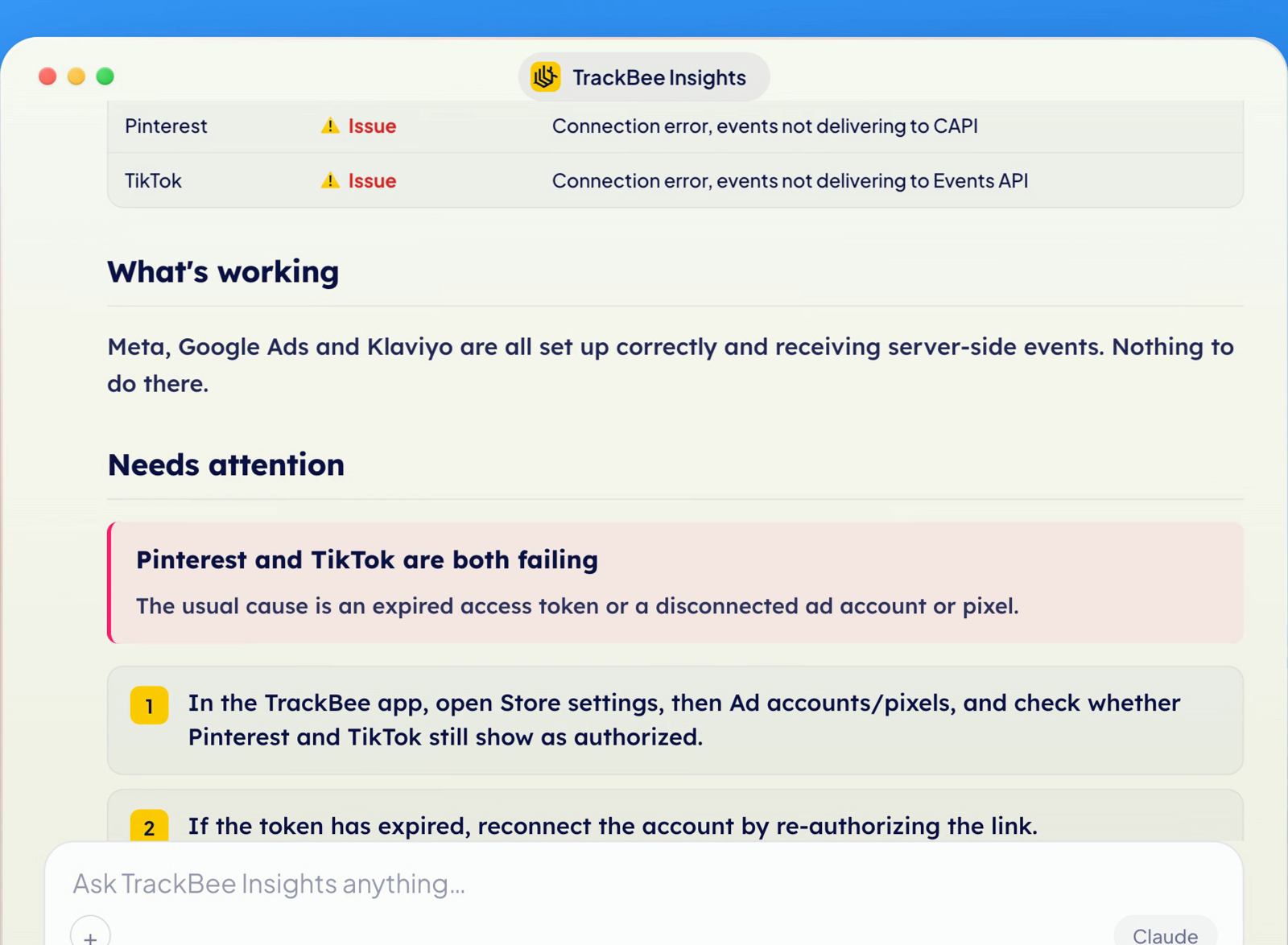
Here Pinterest and TikTok have both stopped delivering. Insights flags them together, names the most likely cause (an expired token or a disconnected account), and gives you the exact steps to check it in the TrackBee app. Say yes, and it produces the full reconnection walkthrough.
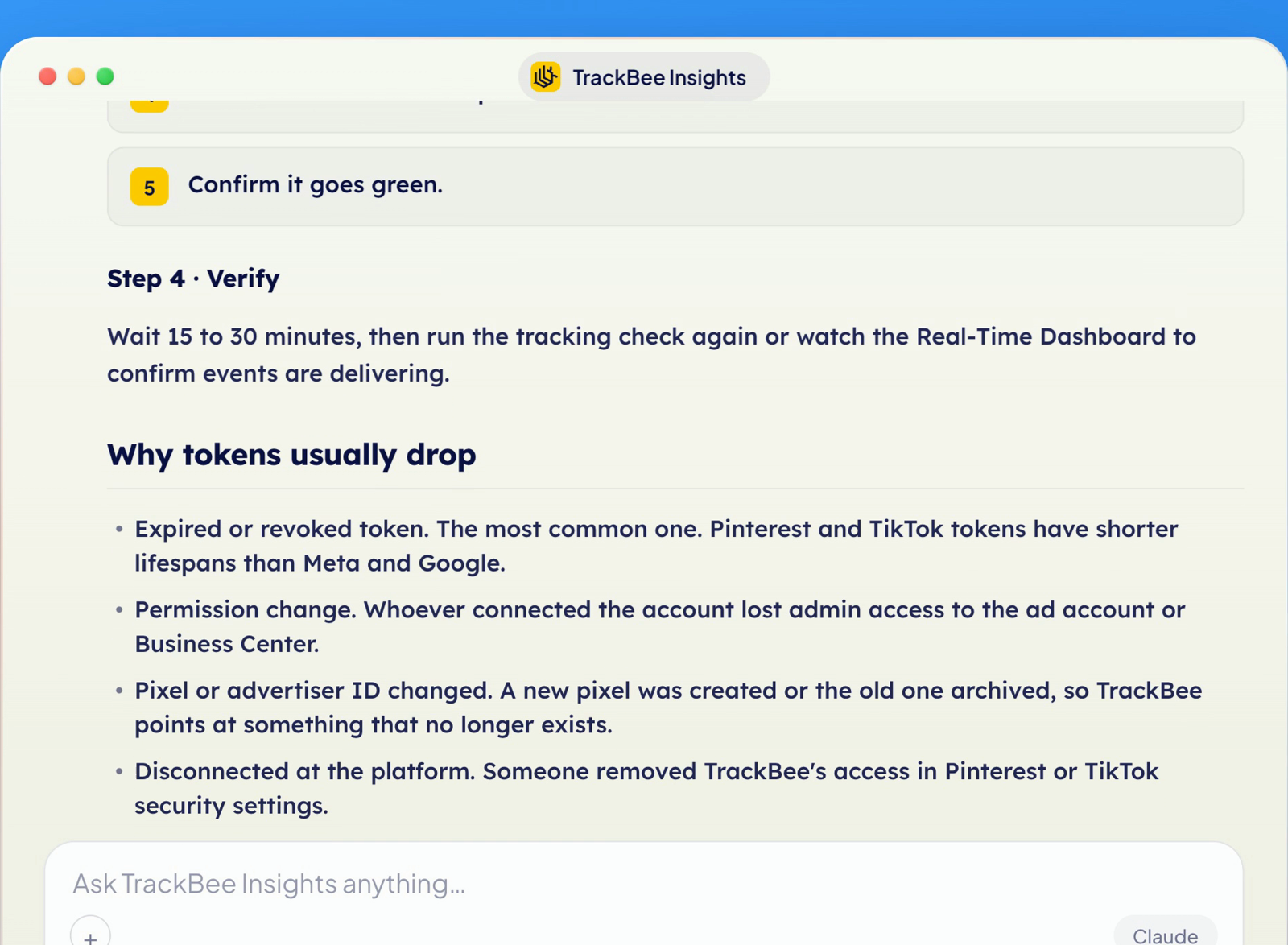
It even reasons about the pattern: if two platforms broke at the same time, the cause is probably shared, like one account whose access changed. That is the difference between a dashboard that shows you a red light and an answer that tells you what to do about it.
How server-side tracking closes the gap
A tracking check tells you what is firing. Server-side tracking is what makes those numbers worth trusting in the first place.
TrackBee is server-side tracking for Shopify that sets up in minutes, no developer project required. It captures the conversions browser pixels miss, enriches it with first-party data, deduplicates events so nothing double-counts, and sends clean signals to Meta, Google, TikTok, Pinterest, and Klaviyo. That is what shrinks the bad part of your gap, the lost-signal part, while leaving the normal attribution differences alone.
Insights is the layer on top that lets you ask about it. The tracking is what makes the answer true.
Frequently asked questions
Is it bad that Meta shows 30 percent more conversions than Shopify? No. A gap of 20 to 35 percent is normal with the default 7-day click plus 1-day view attribution window. The excess comes from view-through and modeled conversions. Only worry if a platform reports 2x or more, which usually means duplicate events, or far fewer than Shopify, which usually means lost signal.
How do I know if my Facebook pixel is actually working? Use the Meta Pixel Helper to confirm events fire as you browse, then place a test order and check that the Purchase event arrives in Events Manager Test Events with a value attached. For a faster read across every platform, run a tracking setup check in TrackBee Insights.
Why are my Meta conversions lower than my Shopify orders? Your browser pixel is missing sales. Ad blockers, iOS privacy, and consent banners stop the pixel from seeing roughly 30 to 60 percent of conversions. Server-side tracking captures those and sends them to Meta directly, which closes most of the gap.
Do I need to check this for every platform separately? Yes, because one channel can be healthy while another is broken. Blended numbers hide a single failing platform. A tracking check that reports per platform, like the one in TrackBee Insights, shows you exactly where the problem is.
How often should I check my tracking? Spot-check after any change to your theme, checkout, or app stack, since those are the most common ways tracking breaks. Beyond that, a quick monthly check catches expired connections before they cost you a full reporting cycle.
→ Try TrackBee Insights free and run a tracking setup check on your own store in a couple of minutes. Or book a free demo and we will check it with you.
Read next: Why Meta conversions don't match Shopify orders | How much revenue are you losing to bad tracking?


.png)