


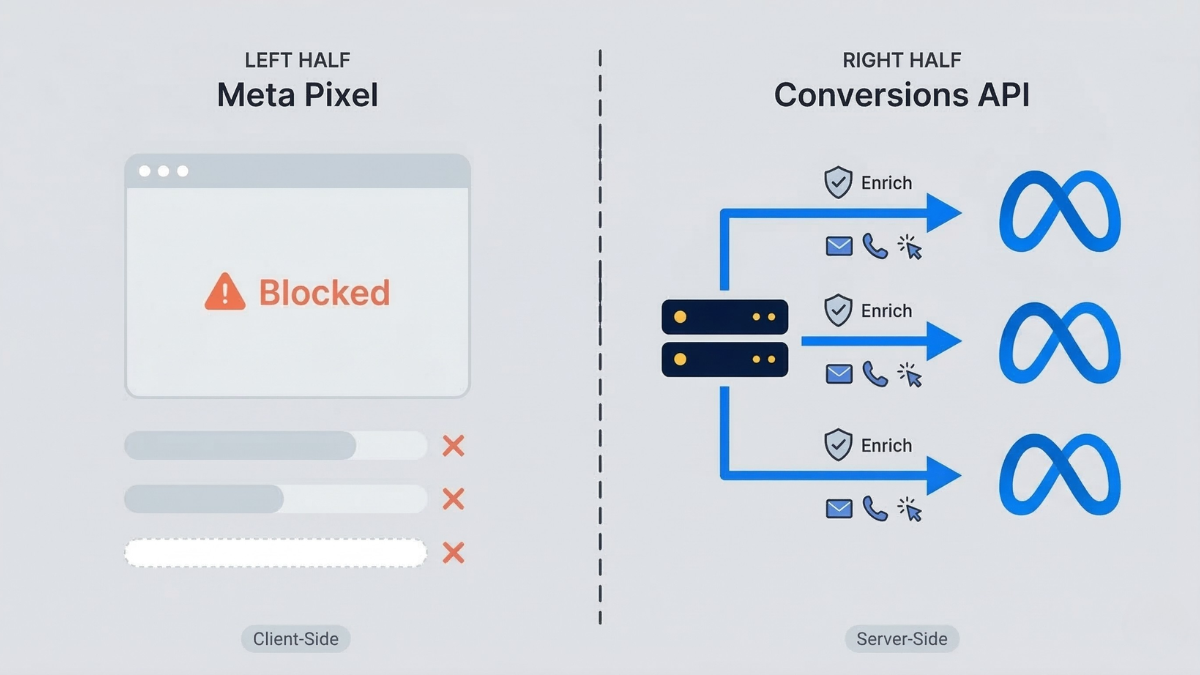


Short answer: To set up the Meta Conversions API on Shopify, you send your purchase and funnel events server-side to Meta and deduplicate them against your Meta Pixel using a shared event ID. The reliable way to do this without code is TrackBee: it captures events at the source, enriches them with first party data to lift Event Match Quality, and handles deduplication automatically in a 5-minute setup.
Meta's Conversions API (CAPI) has gone from optional to essential. If you're running Meta ads for a Shopify store and still relying on the Meta Pixel alone, you're sending incomplete data to Meta's algorithm - and paying for it with higher CPAs, weaker ROAS, and campaigns that struggle to exit the learning phase.
This guide covers everything a Shopify merchant or agency needs to know about Meta CAPI: how it works, why it exists, what Event Match Quality means for your bottom line, and how to set it up correctly - including the specific settings that prevent duplicate tracking from corrupting your data.
What Is Meta's Conversions API?
Meta's Conversions API is a server-to-server interface that lets you send conversion events directly from your server to Meta - bypassing the browser entirely. Unlike the Meta Pixel, which runs as a JavaScript snippet in a visitor's browser, CAPI sends data from your backend infrastructure to Meta's servers.
The key difference:
| Meta Pixel (client-side) | Conversions API (server-side) | |
|---|---|---|
| Where it runs | Visitor's browser | Your server |
| Blocked by ad blockers | Yes | No |
| Affected by iOS restrictions | Yes | Minimal |
| Affected by cookie consent | Yes | Partially - events can still be sent without personal identifiers |
| Data richness | Limited to browser data | Full access to server-side first-party data |
| Reliability | Depends on page load, scripts, browser behavior | Independent of browser state |
The Pixel tells Meta what happened in the browser. CAPI tells Meta what happened on the server. When both work together with proper deduplication, Meta gets a more complete picture of your customer journey than either method provides alone.
Why Meta Made CAPI Essential
CAPI isn't a nice-to-have anymore. Meta strongly recommends it for every advertiser, and for Shopify stores specifically, the reasons are structural.
iOS 14+ and App Tracking Transparency (ATT).
When Apple introduced ATT in 2021, it fundamentally changed how much data browser-based tracking could collect. Users who opt out of tracking - roughly 75-85% on iOS - become significantly harder for the Meta Pixel to track. Click IDs get stripped from URLs. Attribution windows shrink. The Pixel sees fewer conversions, and the ones it does see carry less identifying information.
Ad blockers.
Roughly 30% of desktop users run ad blockers that prevent the Meta Pixel from loading entirely. Those visitors are invisible to client-side tracking - even if they buy.
Cookie restrictions.
Safari's Intelligent Tracking Prevention (ITP) limits first-party cookie lifetimes to 7 days (or 24 hours for cookies set via JavaScript). If a customer clicks your Meta ad on Monday but purchases on the following Tuesday, Safari may have already deleted the cookie that connects those two events.
Google Consent Mode V2.
Since enforcement began, cookie consent frameworks have become stricter. Visitors who decline cookies generate no pixel events at all.
The compounding effect.
These aren't isolated issues. They stack. A visitor on Safari with an ad blocker who declines cookies is completely invisible to your Meta Pixel. That visitor could represent a high-value customer whose purchase never gets attributed to the campaign that drove it.
The result: pixel-only setups miss 15-30% of conversions for most Shopify stores. For stores with high iOS or European traffic, that number climbs to 30-40%. Meta's algorithm then optimizes based on this incomplete data - leading to worse targeting, higher costs, and a cycle of declining performance.
CAPI exists to close that gap.
For a deeper explanation: What is server-side tracking and how to install it for Shopify.
How CAPI Works: Server-to-Server Event Delivery
The mechanics of CAPI are straightforward once you understand the flow.
Standard pixel flow (client-side):
-
Visitor loads your Shopify store
-
Meta Pixel JavaScript loads in their browser
-
Visitor performs an action (views product, adds to cart, purchases)
-
Pixel fires an event from the visitor's browser to Meta's servers
-
Meta receives the event and tries to match it to a known user
CAPI flow (server-side):
-
Visitor performs an action on your Shopify store
-
Your server registers the event
-
Your server enriches the event with first-party data (hashed email, phone, name, address)
-
Your server sends the enriched event directly to Meta's Conversions API endpoint
-
Meta receives the event with richer matching data
The critical advantage of the server-side flow is step 3: enrichment. When events pass through the browser, the only identifying information available is whatever the browser can access - often just an IP address, user agent, and maybe a click ID. When events pass through the server, you can attach first-party customer data that dramatically improves Meta's ability to match that event to a real person.
All customer information sent via CAPI is hashed using SHA-256 before transmission. Meta never receives plain-text personal data through this channel. The hashing happens before the data leaves your server, and Meta matches hashed values against its own hashed user database.
The 5 Events You Should Send via CAPI
Meta's optimization algorithm works best when it receives the full funnel - not just purchases. Each event type provides a different signal that helps Meta understand where prospects are in their buying journey.
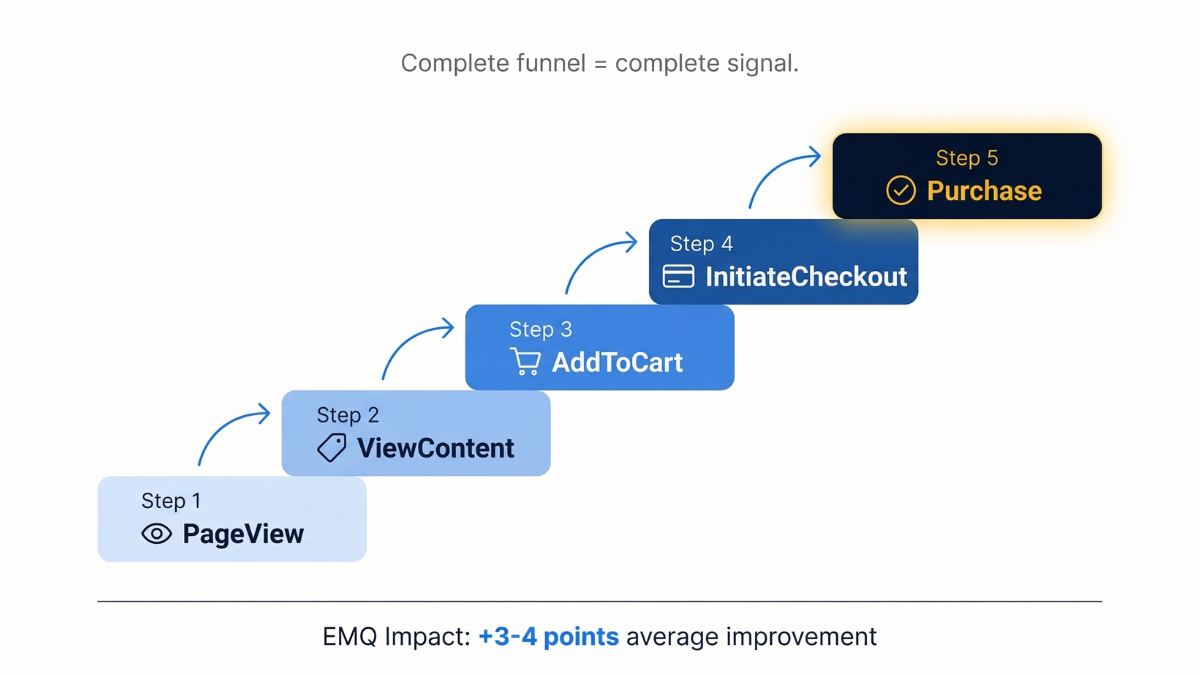
1. PageView The broadest signal. Tells Meta which users are visiting your store and which traffic sources are driving them there. Essential for building retargeting audiences and helping Meta understand your overall audience profile.
2. ViewContent (Product View) When a visitor views a specific product page, this event tells Meta which products generate interest. This feeds dynamic product ads and helps Meta's algorithm learn which product-audience combinations have the highest intent.
3. AddToCart A strong intent signal. Visitors who add items to their cart are significantly more likely to purchase. This event is critical for cart abandonment retargeting and helps Meta identify high-intent audience segments.
4. InitiateCheckout (Begin Checkout) The step between cart and purchase. This event helps Meta understand checkout drop-off rates and optimize for audiences that are most likely to complete a purchase - not just start one.
5. Purchase The conversion event that drives most campaign optimization. Purchase events carry revenue data, order information, and customer identifiers. This is the event that directly feeds ROAS calculations, bidding algorithms, and performance reporting.
Why the full funnel matters:
If you only send Purchase events via CAPI, Meta can optimize for conversions - but it's flying blind on the steps that lead there. Sending all five events gives Meta a complete picture of user intent progression, which improves targeting, bidding accuracy, and audience modeling across your entire funnel.
Event Match Quality Explained
Event Match Quality (EMQ) is one of the most important and most overlooked metrics in your Meta Ads account. It's Meta's measure of how accurately it can match your tracked events to real users on its platform.
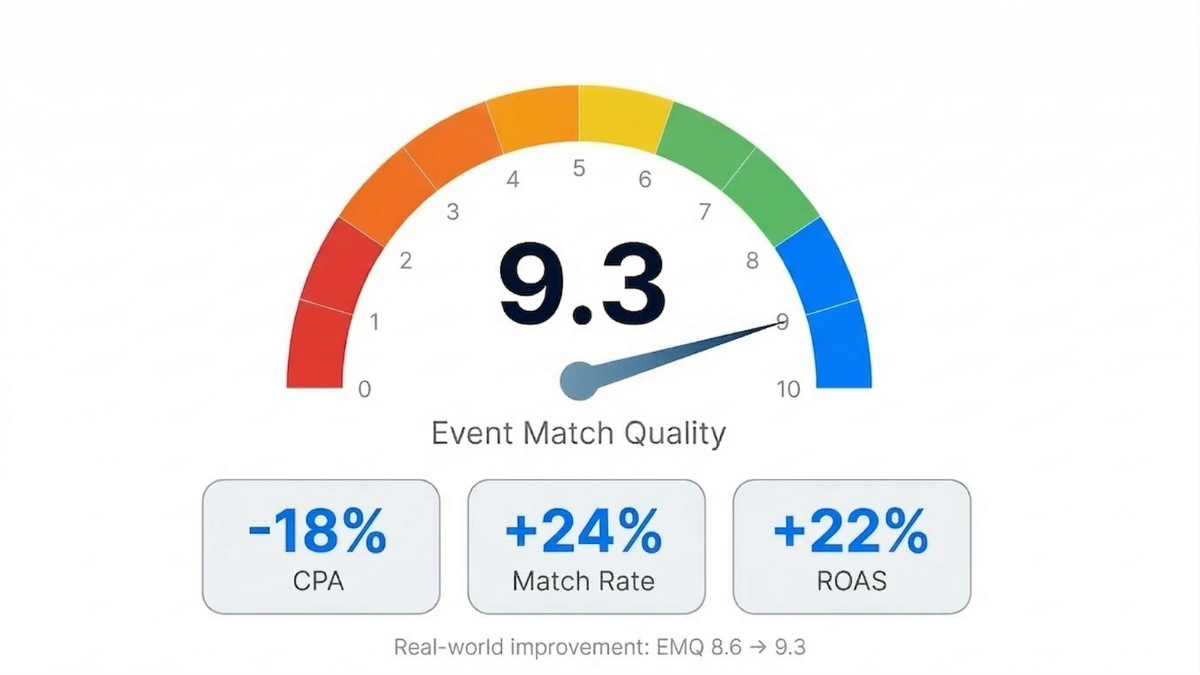
How EMQ is scored: Meta assigns a score from 0 to 10 for each event type, based on the customer information parameters attached to your events. The more parameters you include - and the more accurate they are - the higher your score.
The parameters that matter most:
| Parameter | Impact |
|---|---|
| Email (hashed) | Very high - most reliable identifier |
| Phone number (hashed) | Very high - unique, persistent |
| First name (hashed) | High - used in combination |
| Last name (hashed) | High - used in combination |
| fbclid (Facebook Click ID) | High - directly links event to a Meta click |
| IP address | Medium - useful for anonymous events |
| User agent | Medium - browser/device fingerprint |
| External ID | Medium - your internal customer ID |
Why EMQ matters for your bottom line:
A higher EMQ score means Meta can match more of your events to actual users. When Meta can do that, several things improve simultaneously:
-
Better optimization. Meta's algorithm makes smarter bidding decisions because it's learning from events it can confidently attribute to real people.
-
Lower CPAs. More matched events means Meta understands your converting audience better, reducing wasted spend on low-intent users.
-
Faster learning phases. Campaigns need fewer impressions to accumulate the matched conversion data Meta needs to exit the learning phase.
-
More accurate reporting. Fewer unmatched events means the performance you see in Ads Manager more closely reflects reality.
Standard pixel-only tracking typically produces EMQ scores in the 3-6 range. Server-side tracking with proper enrichment consistently delivers scores of 7-9.
For a detailed breakdown of improving your EMQ: How to improve Meta's Event Match Quality score for better ad performance.
Why You Need Both Browser and Server-Side Tracking
A common misconception: if CAPI is better, you should just turn off the pixel and use CAPI exclusively. That's wrong. Meta explicitly recommends running both simultaneously. The two methods complement each other.
The browser pixel captures real-time behavioral data
- scroll depth, time on page, micro-interactions - that isn't available server-side. It also fires instantly as events happen, providing immediate signal.
CAPI captures events the pixel misses
- purchases from ad-blocked browsers, iOS users who opted out of tracking, visitors who declined cookies - and enriches them with first-party data the browser doesn't have access to.
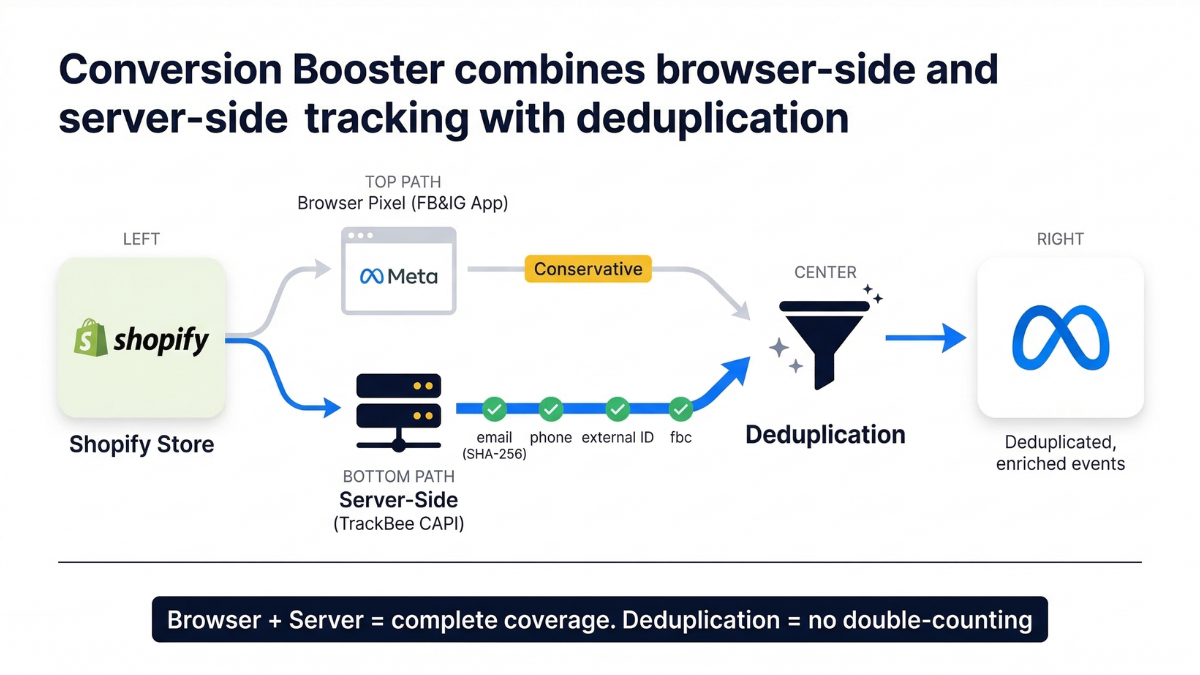
Together, they provide near-complete event coverage. But there's a critical requirement: deduplication.
When both methods capture the same event, Meta receives it twice. Without deduplication, your conversion volume is inflated, your CPA metrics are understated, and Meta's algorithm is learning from corrupted data. Proper deduplication ensures each event is counted exactly once, regardless of how many tracking methods captured it.
This is what TrackBee calls the Conversion Booster: the combination of browser-side tracking (via the Facebook & Instagram Shopify app) and server-side tracking (via TrackBee's CAPI integration), with automatic deduplication to keep your data clean.
For the full explanation of why deduplication is non-negotiable: Why profitable ad campaigns need event deduplication and two tracking methods.
The Critical Data Sharing Setting
This is the single most common configuration mistake Shopify merchants make when setting up Meta CAPI alongside the Meta Pixel - and it can silently corrupt your conversion data.
The Facebook & Instagram Shopify app has a data sharing setting with three levels: Standard, Enhanced, and Maximum. When you're also running server-side tracking via CAPI, this setting must be on "Conservative" (previously called Standard).
Why this matters:
At the Enhanced or Maximum level, the FB&IG Shopify app sends additional events server-side on its own. If you're also running a dedicated CAPI solution like TrackBee, you now have two server-side sources sending the same events - on top of the browser pixel. That creates triple-counting that deduplication can't always resolve, because the events come from different sources with different event IDs.
The symptoms of this misconfiguration:
-
Inflated conversion counts in Meta Ads Manager
-
Artificially low CPA numbers that don't match reality
-
Meta's algorithm making overly aggressive bid decisions based on phantom conversions
-
A growing gap between Meta-reported revenue and actual Shopify revenue
The fix is simple:
set the FB&IG Shopify app data sharing to Conservative. Let the app handle browser-side pixel tracking, and let your CAPI solution handle server-side. One source for each tracking method. Clean deduplication. Accurate data.
For more on why Meta and Shopify numbers diverge: Meta conversions don't match Shopify - here's why.
Custom Audience Sync via CAPI
Beyond conversion tracking, CAPI enables something most Shopify stores underuse: automated audience syncing.
TrackBee automatically creates and maintains a "TrackBee - All Customers" audience in your Meta Ads Manager. This audience is synced every 5-15 minutes, keeping it continuously current with your latest customer data.
How to use it:
-
Lookalike source. Build Lookalike audiences from your real customer base - not from pixel data that only captured 60-70% of your buyers.
-
Exclusion audience. Exclude existing customers from acquisition campaigns so you're not spending acquisition budget on people who've already purchased.
-
Advantage+ suggestions. Use the audience as a suggestion signal for Advantage+ campaigns, giving Meta a richer starting point for its automated targeting.
The value of this synced audience compounds over time. The more complete your customer data, the better Meta can find people who look like your best customers - and the less budget you waste reaching people who've already converted.
New vs. Returning Customer Signals
One of the most impactful data points you can send to Meta is whether a purchase came from a new or returning customer. Without this signal, Meta treats every conversion equally - which means your acquisition campaigns might be spending budget on people who were going to buy again anyway.
TrackBee sends two custom purchase events to Meta:
-
NewCustomerPurchase - first-time buyers
-
ReturningCustomerPurchase - repeat customers
What this enables:
Revenue split visibility.
You can see exactly how much of your Meta-attributed revenue comes from new customers versus returning ones. If 60% of your "acquisition" campaign revenue is from returning customers, you're overpaying for repeat purchases.
Audience exclusion.
Create exclusion audiences based on returning customers to ensure your acquisition budget goes exclusively toward new customer growth.
Separate optimization.
Run campaigns optimized specifically for new customer acquisition, with bidding based on actual new customer purchases - not total purchases that include repeat buyers.
For a detailed strategy: How to stop wasting Meta ad budget on returning customers.
Real Results: What Better CAPI Data Delivers
The theory behind CAPI is sound. The numbers confirm it.
EMQ improvement impact: An EMQ improvement from 8.6 to 9.3 - less than a single point - produced measurable results: CPA reduced by 18%, match rate increased by 24%, and ROAS lifted by 22%. This isn't from changing ads, audiences, or budgets. It's purely from sending better data to the same algorithm.
saw a 100% ROAS increase after implementing server-side tracking with TrackBee's Meta CAPI integration. The improvement came from better data coverage and higher Event Match Quality - not from changes to their campaign strategy.
Data coverage improvement: TrackBee captures 30-40% more conversion data than pixel-only setups. That's 30-40% more signal for Meta's algorithm to learn from - conversions that were previously invisible due to ad blockers, iOS restrictions, and cookie consent.
These results are consistent because the mechanism is straightforward: better input data produces better algorithmic output. When Meta's algorithm receives more complete, more accurately matched conversion data, it makes better decisions about who to show your ads to and how much to bid. You don't need to change your creative or your targeting strategy. The algorithm does a better job with the same campaigns because it finally has the data it needs.
For scaling strategies built on this foundation: Scaling Facebook ads without losing ROAS.
How to Set Up Meta CAPI on Shopify
There are two approaches to implementing Meta CAPI on Shopify: manual setup via Meta's own tools, or using a server-side tracking platform like TrackBee.
Option 1: Manual setup via Meta and Shopify
-
Install the Facebook & Instagram Shopify app
-
Connect your Meta Pixel and Facebook Business account
-
Configure data sharing settings (set to Conservative if using any additional CAPI solution)
-
In Meta Events Manager, set up the Conversions API by creating an access token
-
Configure your server to send events to Meta's CAPI endpoint with proper parameters
-
Implement event deduplication by matching event IDs between pixel and CAPI events
-
Verify events are being received and deduplicated in Meta Events Manager
Limitations of manual setup:
-
Requires developer resources to build and maintain the server-side integration
-
Event enrichment (adding hashed customer data) must be implemented manually
-
Deduplication logic must be built and tested
-
No automatic EMQ optimization
-
Breaks silently when Shopify updates, Meta API changes, or server configurations drift
Option 2: Setup with TrackBee
-
Sign up at app.trackbee.io
-
Add your Shopify store (Stores - Add Store - authenticate)
-
Go to Connections and connect your Meta account
-
Enable the TrackBee App Embed in Shopify (Online Store - Customize - App Embeds - TrackBee ON)
-
Set the FB&IG Shopify app data sharing to Conservative
-
Verify by placing a test order and checking the Accuracy page
What TrackBee handles automatically:
-
Server-side event delivery for all 5 funnel events
-
Event enrichment with hashed first-party data (email, phone, name, address)
-
Deduplication between browser pixel and server-side events
-
Custom Audience syncing every 5-15 minutes
-
New vs. Returning customer signals
-
EMQ optimization through persistent shopper profiles
-
Ongoing maintenance as platform APIs change
Setup takes under 5 minutes. No developer required.
For broader server-side tracking context: The ultimate server-side tracking guide.
Frequently Asked Questions
Is Meta CAPI the same as server-side tracking? CAPI is Meta's specific implementation of server-side tracking. "Server-side tracking" is the broader concept - sending events from your server instead of the browser. CAPI is how Meta receives those server-side events. Google has Enhanced Conversions, TikTok has the Events API, and Pinterest has its Conversions API. Each platform has its own server-side endpoint, but the principle is the same.
Do I still need the Meta Pixel if I have CAPI? Yes. Meta recommends running both. The pixel captures real-time browser data and provides immediate event signals. CAPI fills the gaps the pixel misses and enriches events with server-side data. Together with deduplication, they provide the most complete and accurate data possible.
Will Meta CAPI show up in the Meta Pixel Helper browser extension? No. The Pixel Helper only detects client-side pixel fires. Server-side CAPI events are invisible to browser extensions because they never pass through the browser. To verify CAPI events, check Meta Events Manager and look for events with a "Server" source.
How long does it take to see CAPI data in Meta Ads Manager? CAPI events can take up to 48 hours to fully appear in Meta Events Manager and Ads Manager. During the initial setup period, don't panic if numbers look off - give the system 48-72 hours to stabilize.
Does CAPI fix iOS tracking issues? CAPI significantly mitigates iOS tracking issues. Since events are sent server-side, they aren't affected by App Tracking Transparency opt-outs or Safari's cookie restrictions. However, CAPI still relies on identifying information - if a visitor never provides an email or phone number (pre-purchase funnel events), the match quality for those specific events depends on other parameters like IP address and user agent.
Can I send too much data via CAPI? You should send all relevant funnel events, but accuracy matters more than volume. Sending incorrect or mismatched customer data actively hurts your EMQ score. It's better to send fewer parameters with high accuracy than many parameters with errors.
What's the difference between CAPI and Enhanced Conversions? CAPI is Meta's server-side tracking solution. Enhanced Conversions is Google's equivalent. They serve the same purpose - getting conversion data to the ad platform server-side - but use different APIs and configurations. If you advertise on both Meta and Google, you need both.
Does CAPI work with Consent Mode V2? Yes. When a visitor declines consent, CAPI can still send the conversion event without personal identifiers. Meta then uses data from consenting users to model the behavior of non-consenting visitors. This means you don't lose 100% of declined-consent conversions - Meta can still partially account for them.
Ready to improve your Meta ad performance?
Start your free 30-day TrackBee trial - no developer needed, setup in under 5 minutes.
Read next: How to improve your Event Match Quality score | Why you need event deduplication
Ready to fix your tracking?
TrackBee installs in minutes, no developer needed. Try TrackBee for free, or book a free demo.


.png)


