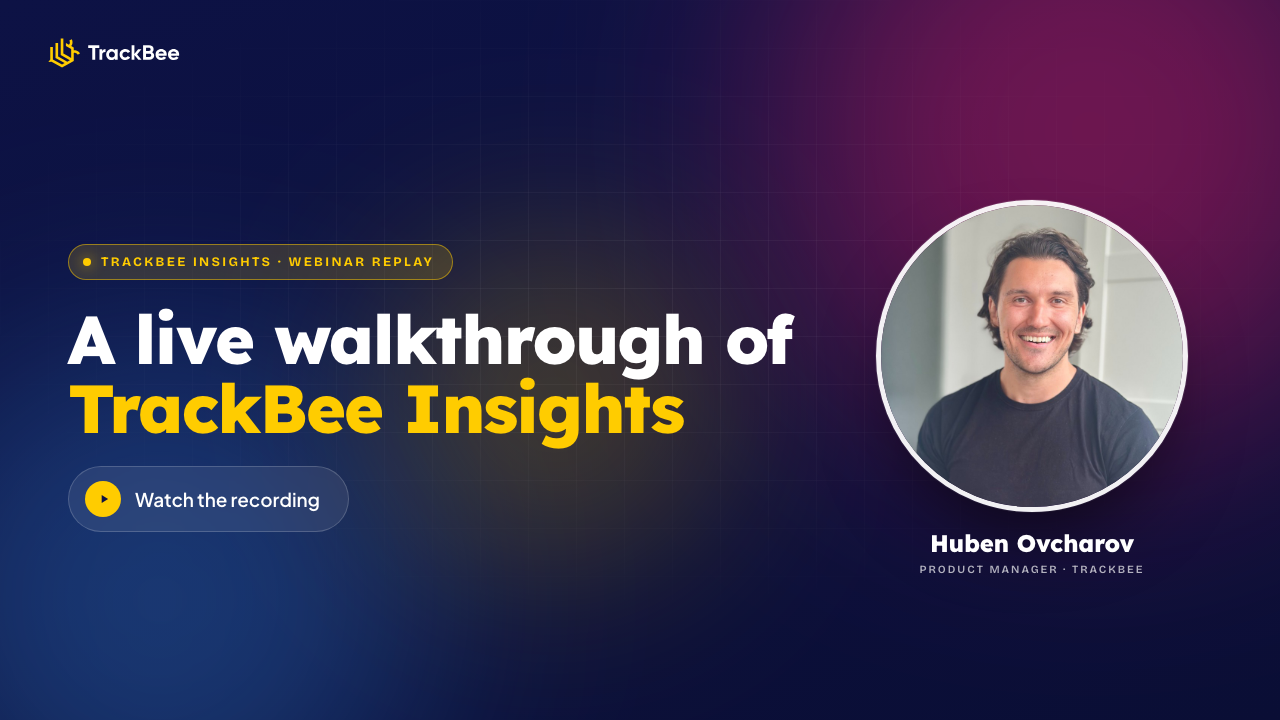

How to scale Shopify ads with Claude or ChatGPT

AI has reshaped how we write, summarise, and code. It hasn't yet reshaped how most Shopify brands read their ad performance. On June 3 we hosted a live session showing how to close that gap with TrackBee Insights: a connector that lets you ask Claude or ChatGPT what's actually driving your sales, using your own first-party, cross-platform ad data.

June 4, 2026
Huben Ovcharov
Latest
TrackBee Insights

How to scale Shopify ads with Claude or ChatGPT

Ananlysing dashboards is a time-consuming task. You're spending more, running more campaigns, testing more creative, and the platforms keep telling you different versions of the same week. Meta says one number. Google says another. Shopify shows a third. Somewhere in between is the truth, and you don't have time to find it.

We hosted a live session on June 3 with brands and agencies hitting exactly that wall. It walked through three problems that break when you scale your Shopify ads, and how TrackBee Insights solves them by letting you ask your own first-party cross-platform data the way you'd ask a great analyst, in Claude or ChatGPT.

→ Watch the full webinar replay (free!)

The short version is here.

The three things that break when you scale Shopify ads

Three problems show up for almost every brand past €100K/month in revenue. In isolation they sound trivial. Combined, they're the reason most scale attempts cost more than they should.

1. Attribution doesn't add up
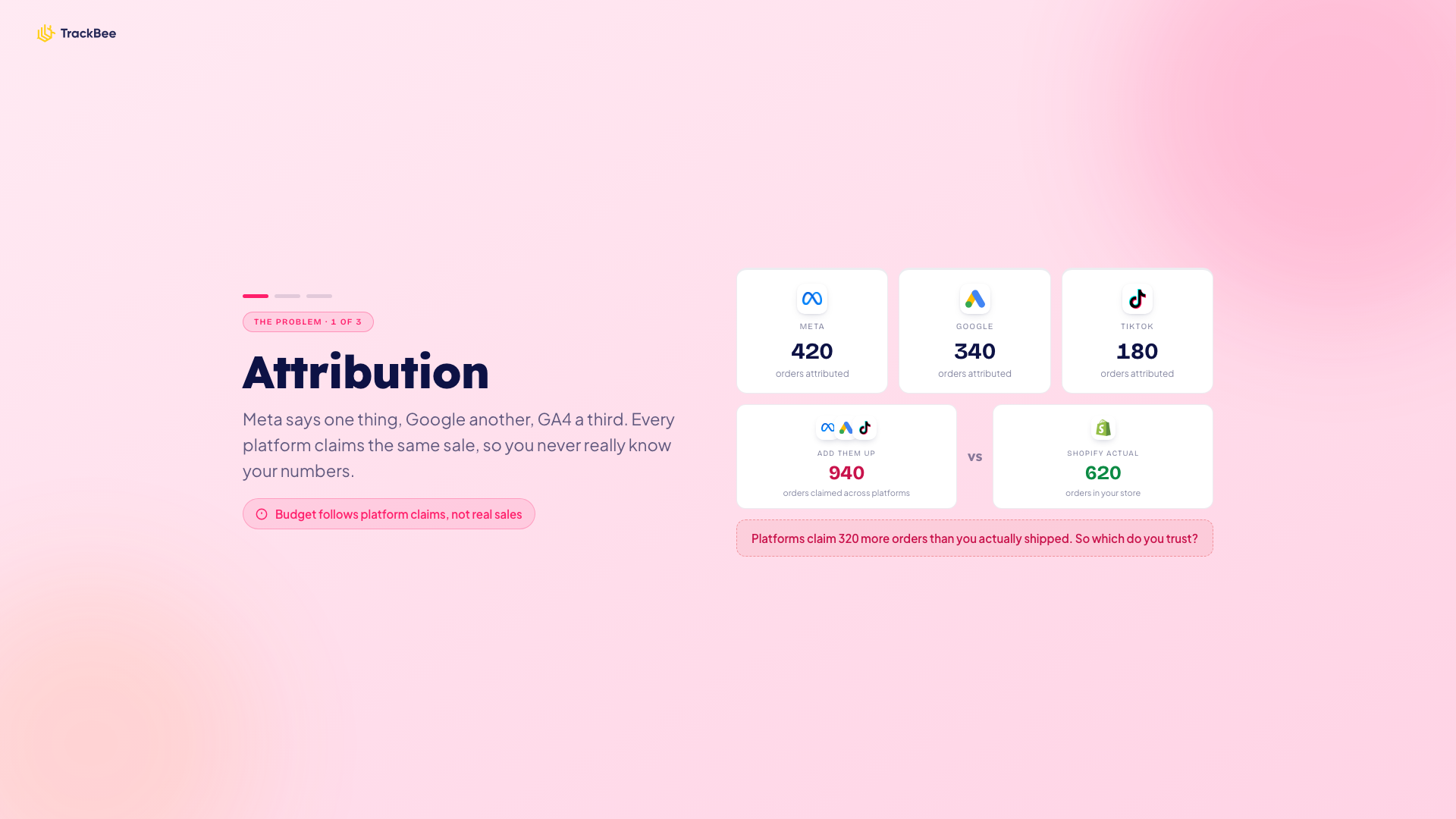
Add the orders Meta claims to the ones Google claims to the ones TikTok claims, and the total is usually 30 to 50 percent higher than the number of orders that actually shipped in Shopify. Every platform is incentivised to overclaim, and there's no single source pulling the numbers honestly. So your budget calls follow platform self-reports, not real sales contribution. Cross-platform attribution stops being a nice-to-have and becomes the thing standing between you and a confident scale.

2. Too many campaigns, not enough clear decisions

A growing account fast hits 20 to 40 active ad sets across Meta and Google. Every week brings the same questions: which ones to scale, which to pause, which to leave alone. Top-of-funnel or bottom-of-funnel, broad or lookalike, fresh or retargeting. Without a clear read across all of them at once, the decisions slip into the "leave it alone and hope" bucket, and another week of spend goes by on autopilot.

3. Creative fatigue you only spot after it has cost you

Frequency creeps up. CTR drifts down. ROAS holds for two weeks, then collapses. By the time the headline metrics tell you a creative is fatigued, you've already paid for the lesson. Detecting creative fatigue before it shows in revenue is genuinely hard without a system watching every ad's leading indicators in one place.

Watch the full session

Huben Ovcharov, our Product Manager, ran a 45-minute live walkthrough including the live demo and audience Q&A. Drop your email and get the full recording.

→ Watch the webinar replay

From six dashboards to one conversation
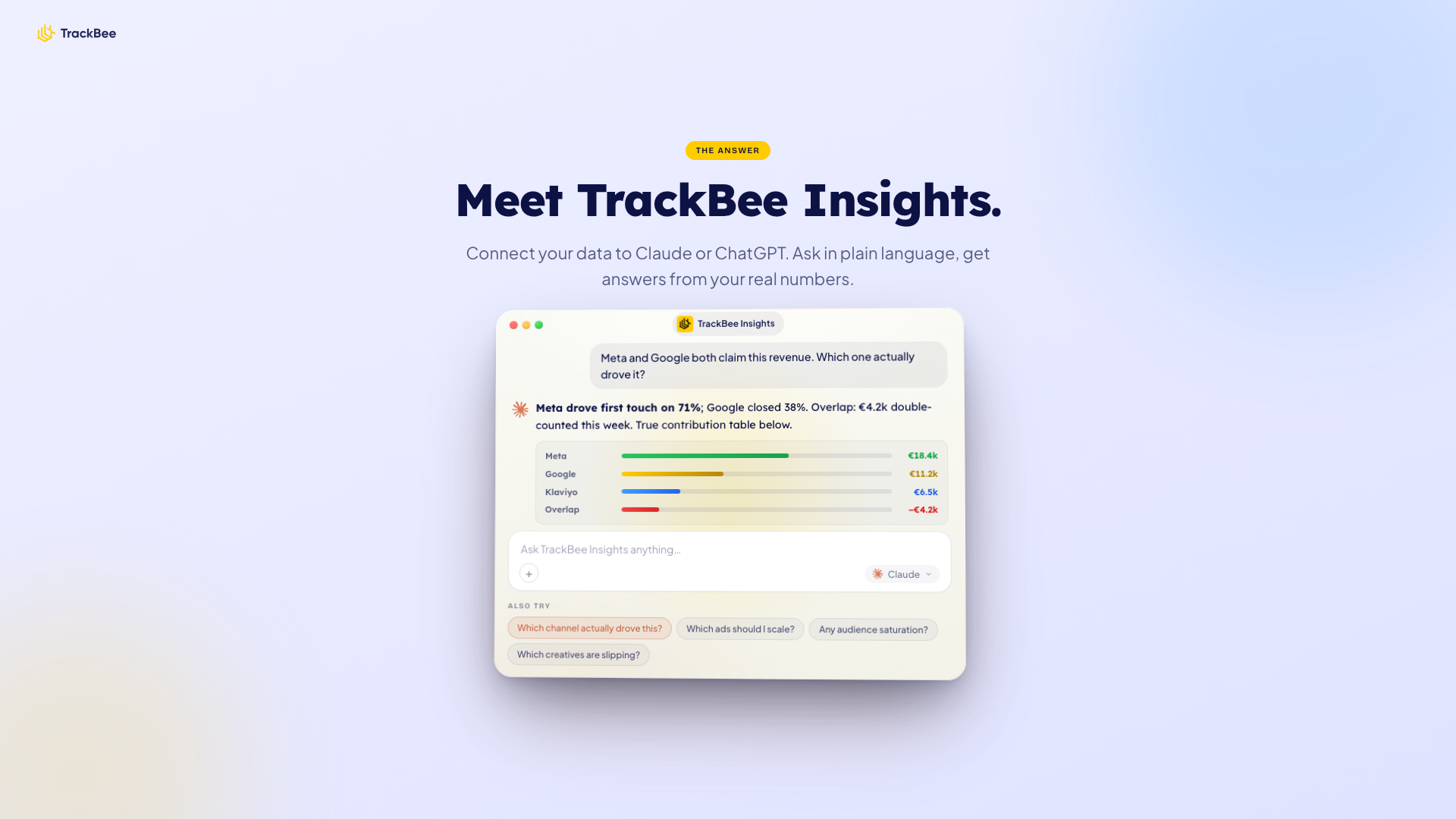
The shift TrackBee Insights makes is simple but big. Instead of bouncing between Meta Ads Manager, Google Ads, GA4, TikTok, Pinterest, and a Google Sheet trying to reconcile numbers, you ask one question in plain language. Your real, server-side, first-party data already sits in TrackBee. We surface it to Claude or ChatGPT through a connector, formatted so the model can actually reason about it.

You ask: "Which campaign should I scale this week?"
You get: a ranked list with ROAS, spend, a recommended action, and a follow-up prompt to dig deeper.

No prompt engineering. No CSV exports. No second-guessing platform attribution.

This works because the data foundation is solid. TrackBee has handled server-side tracking for Shopify brands for over three years: capturing conversions that browser pixels miss (ad blockers, iOS privacy, consent banners), enriching them with first-party shopper data, and sending clean signals back to every ad platform. TrackBee Insights is what happens when you point an AI at that clean foundation.

The three reports that solve each problem

Inside TrackBee Insights you get three pre-built reports, each one mapped to one of the problems above. Every report ends with a set of follow-up prompts you can paste straight into Claude or ChatGPT to go deeper.

Attribution report
Attribution report trackbee insights

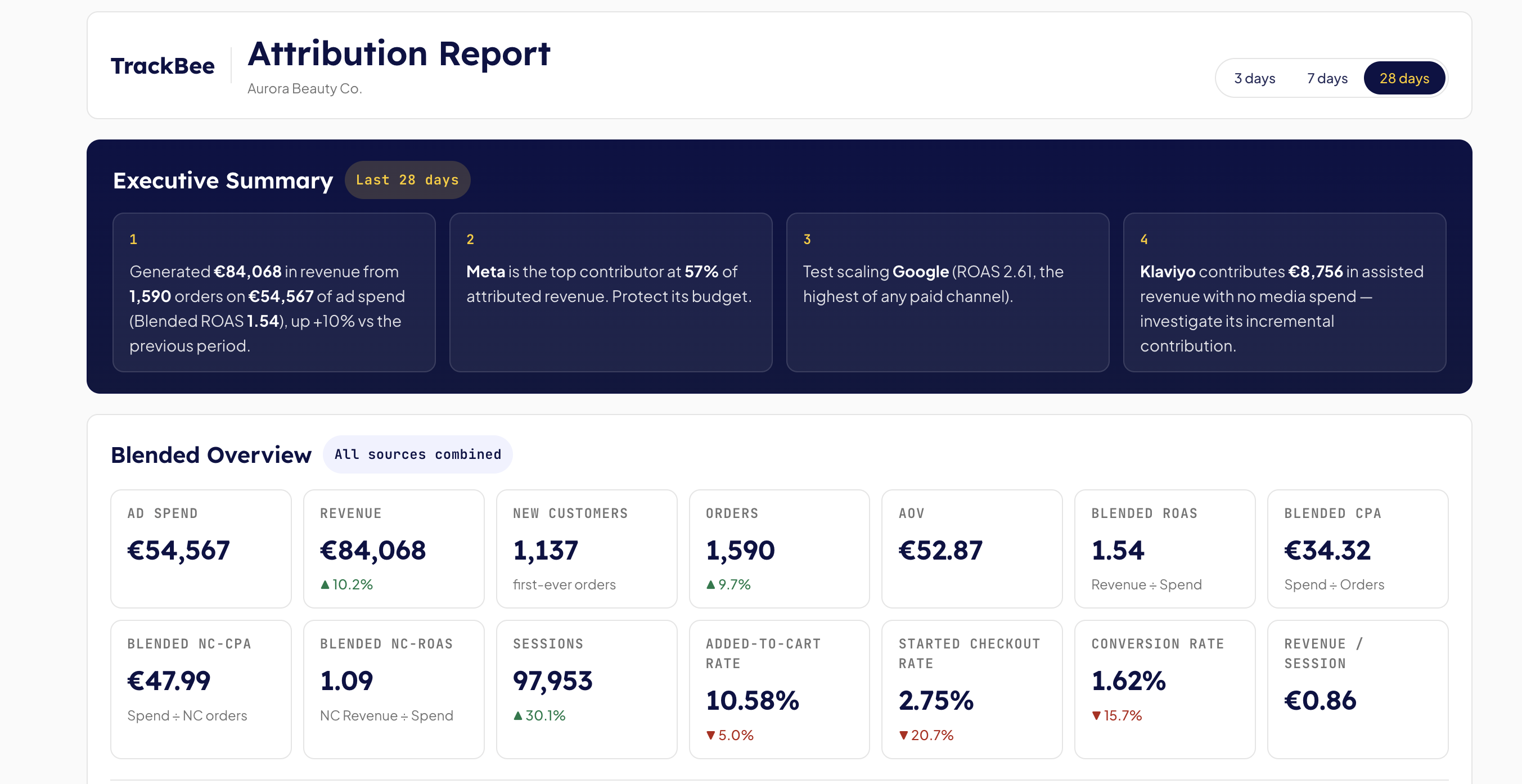
Blended stats across Meta, Google, TikTok, and Pinterest, filterable for the last 3, 7, or 28 days. You see total revenue, blended new-customer acquisition, and the platforms' overlap, how much each one over- or under-reports. Customer-journey breakdowns split single-touch, multi-touch, and organic interactions, so you can refine your channel mix based on actual contribution, not platform claims.

Prompt: /attribution

Ad performance report
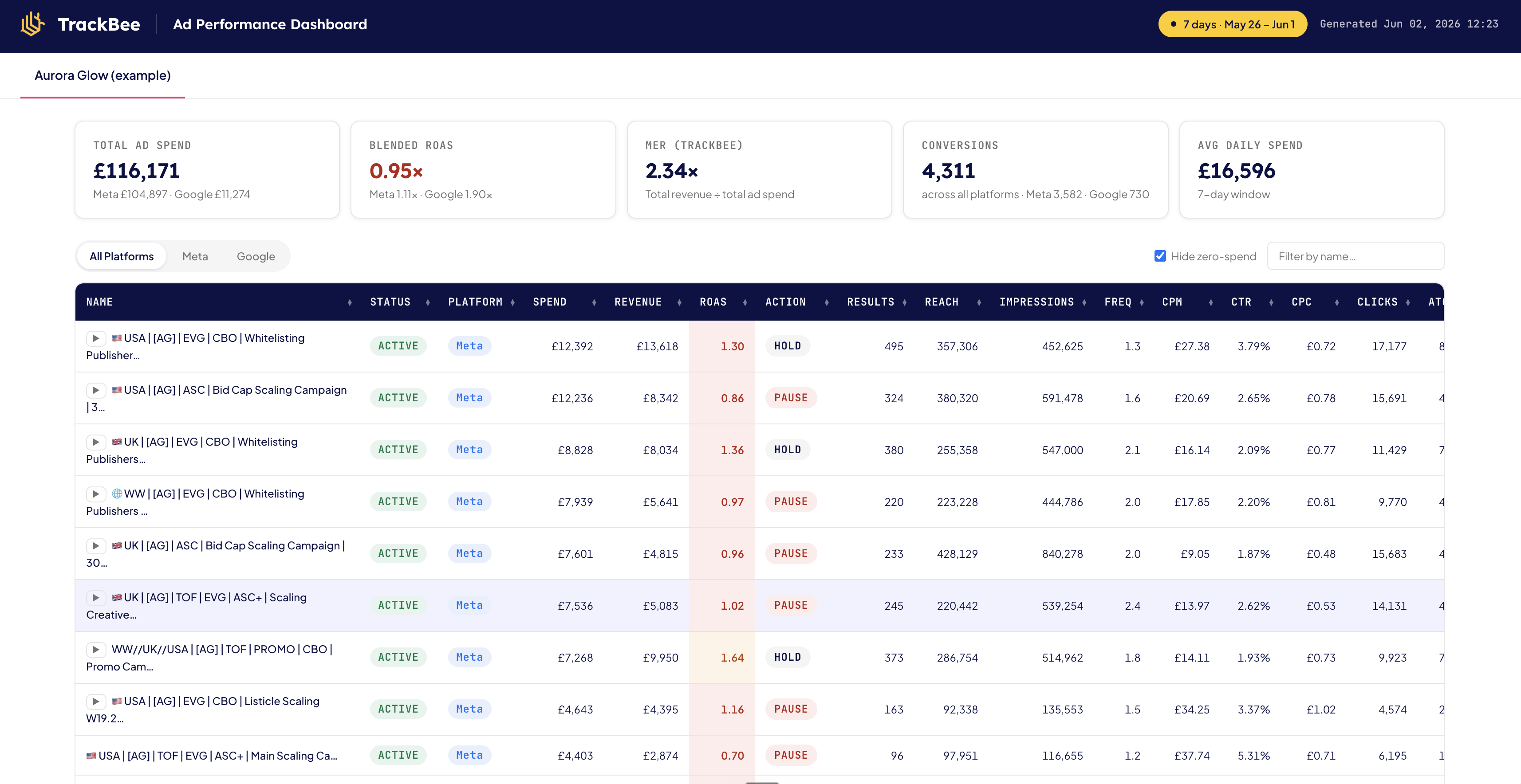
Ad performance report trackbee insights

Aggregates active campaigns from Meta and Google into one view, then surfaces clear scale, pause, or watch recommendations per campaign. It strips out the noise and gives you the read a senior media buyer would give you, in one screen. Click through to deeper analysis from any line in the table.

Prompt: /analyze-ad-performance

Creative audit

Creative audit dashboard trackbee insights

The one most teams light up about. Every Meta and Google ad, image, video, copy, headline, appears next to its performance metrics. You audit static and video creative side by side, spot which angles still convert, and get production recommendations for the next iteration. Creative fatigue stops being a guess.

Live demo: ask Claude or ChatGPT about your winners and losers
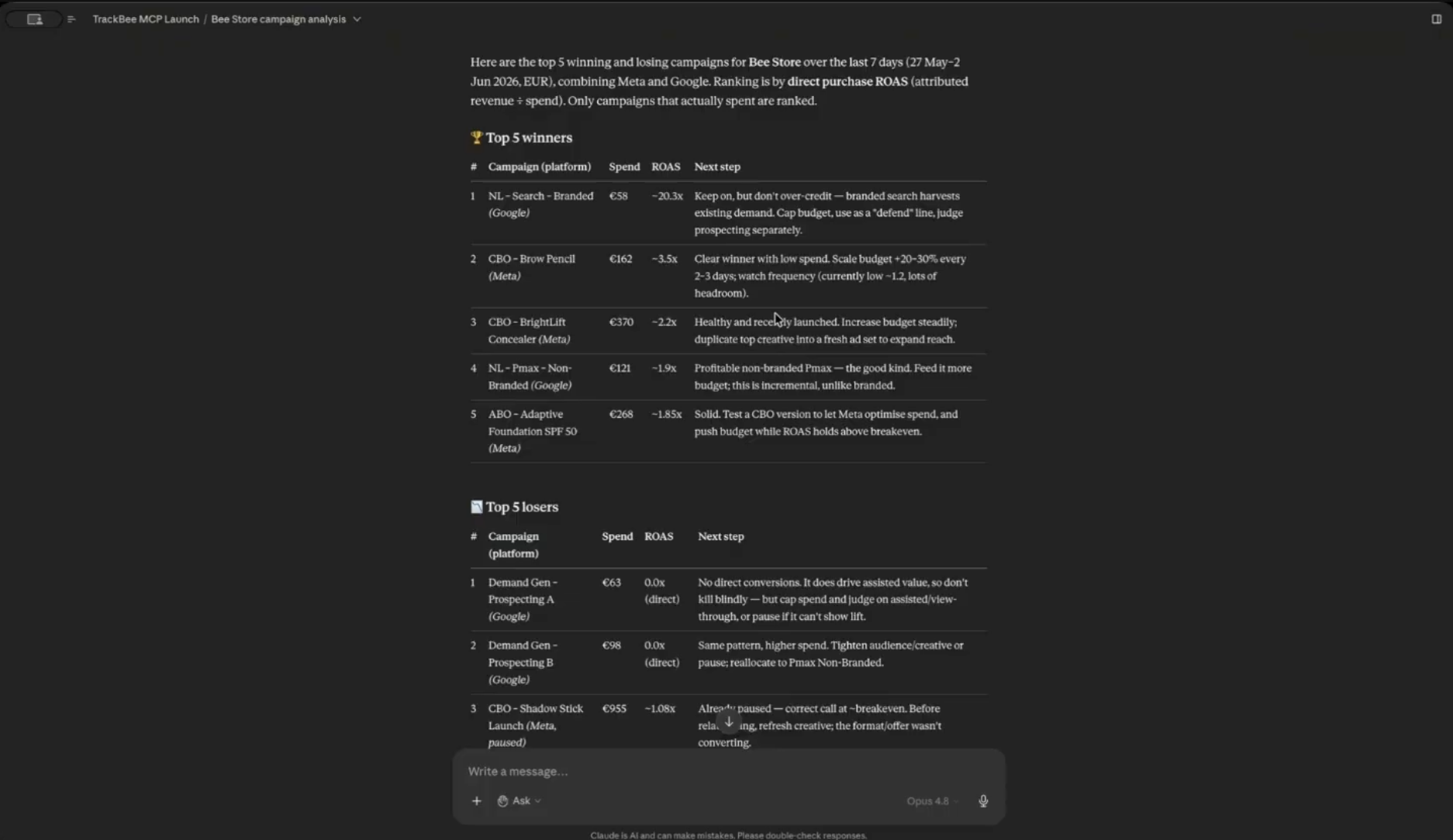
Claude screenshot

During the session, Huben opened Claude with TrackBee Insights connected and asked one question: "Show me my top 5 winning and losing campaigns from the last 7 days." The model came back with spend, ROAS, suggested next steps for each campaign, and a follow-up prompt for going deeper into frequency, reach, or minimum-spend thresholds.

Same question in ChatGPT, same answer. The data is identical because TrackBee formats it for the model rather than hoping the model figures out your messy CSV. Whether your team prefers Claude or ChatGPT, the analysis is consistent.

Setup is two minutes

There is no integration project here. Inside the TrackBee app there's a dedicated onboarding section for each AI tool:

  • Claude: install the TrackBee Insights connector and you're live.
  • ChatGPT: add the basic connection, same thing.

The onboarding walks you through the kinds of questions to start with and what data each report can answer. TrackBee Insights has been live for customers since 19 May 2026, and we've watched stores use it daily for performance reviews, weekly for budget reallocation, and monthly for retros.

Try it free until 1 July

TrackBee Insights is included at no extra cost for every TrackBee user through 1 July 2026. Connect it today, run it on your real campaigns, and decide if it's worth keeping.

After the free period it stays a simple add-on: €19.99 per month or €199.90 per year, on top of your existing TrackBee plan.

→ Watch the full webinar replay

→ Try TrackBee Insights free

Frequently asked questions

In this article
Boost Your Revenue
Track Missing Conversion Data
Lorem Ipsum

Boost Your Revenue

Track & Enrich
Missing Conversion Data

Try for free
Share this:

Ananlysing dashboards is a time-consuming task. You're spending more, running more campaigns, testing more creative, and the platforms keep telling you different versions of the same week. Meta says one number. Google says another. Shopify shows a third. Somewhere in between is the truth, and you don't have time to find it.

We hosted a live session on June 3 with brands and agencies hitting exactly that wall. It walked through three problems that break when you scale your Shopify ads, and how TrackBee Insights solves them by letting you ask your own first-party cross-platform data the way you'd ask a great analyst, in Claude or ChatGPT.

→ Watch the full webinar replay (free!)

The short version is here.

The three things that break when you scale Shopify ads

Three problems show up for almost every brand past €100K/month in revenue. In isolation they sound trivial. Combined, they're the reason most scale attempts cost more than they should.

1. Attribution doesn't add up

Add the orders Meta claims to the ones Google claims to the ones TikTok claims, and the total is usually 30 to 50 percent higher than the number of orders that actually shipped in Shopify. Every platform is incentivised to overclaim, and there's no single source pulling the numbers honestly. So your budget calls follow platform self-reports, not real sales contribution. Cross-platform attribution stops being a nice-to-have and becomes the thing standing between you and a confident scale.

2. Too many campaigns, not enough clear decisions

A growing account fast hits 20 to 40 active ad sets across Meta and Google. Every week brings the same questions: which ones to scale, which to pause, which to leave alone. Top-of-funnel or bottom-of-funnel, broad or lookalike, fresh or retargeting. Without a clear read across all of them at once, the decisions slip into the "leave it alone and hope" bucket, and another week of spend goes by on autopilot.

3. Creative fatigue you only spot after it has cost you

Frequency creeps up. CTR drifts down. ROAS holds for two weeks, then collapses. By the time the headline metrics tell you a creative is fatigued, you've already paid for the lesson. Detecting creative fatigue before it shows in revenue is genuinely hard without a system watching every ad's leading indicators in one place.

Watch the full session

Huben Ovcharov, our Product Manager, ran a 45-minute live walkthrough including the live demo and audience Q&A. Drop your email and get the full recording.

→ Watch the webinar replay

From six dashboards to one conversation

The shift TrackBee Insights makes is simple but big. Instead of bouncing between Meta Ads Manager, Google Ads, GA4, TikTok, Pinterest, and a Google Sheet trying to reconcile numbers, you ask one question in plain language. Your real, server-side, first-party data already sits in TrackBee. We surface it to Claude or ChatGPT through a connector, formatted so the model can actually reason about it.

You ask: "Which campaign should I scale this week?"
You get: a ranked list with ROAS, spend, a recommended action, and a follow-up prompt to dig deeper.

No prompt engineering. No CSV exports. No second-guessing platform attribution.

This works because the data foundation is solid. TrackBee has handled server-side tracking for Shopify brands for over three years: capturing conversions that browser pixels miss (ad blockers, iOS privacy, consent banners), enriching them with first-party shopper data, and sending clean signals back to every ad platform. TrackBee Insights is what happens when you point an AI at that clean foundation.

The three reports that solve each problem

Inside TrackBee Insights you get three pre-built reports, each one mapped to one of the problems above. Every report ends with a set of follow-up prompts you can paste straight into Claude or ChatGPT to go deeper.

Attribution report

Attribution report trackbee insights

Blended stats across Meta, Google, TikTok, and Pinterest, filterable for the last 3, 7, or 28 days. You see total revenue, blended new-customer acquisition, and the platforms' overlap, how much each one over- or under-reports. Customer-journey breakdowns split single-touch, multi-touch, and organic interactions, so you can refine your channel mix based on actual contribution, not platform claims.

Prompt: /attribution

Ad performance report

Ad performance report trackbee insights

Aggregates active campaigns from Meta and Google into one view, then surfaces clear scale, pause, or watch recommendations per campaign. It strips out the noise and gives you the read a senior media buyer would give you, in one screen. Click through to deeper analysis from any line in the table.

Prompt: /analyze-ad-performance

Creative audit

Creative audit dashboard trackbee insights

The one most teams light up about. Every Meta and Google ad, image, video, copy, headline, appears next to its performance metrics. You audit static and video creative side by side, spot which angles still convert, and get production recommendations for the next iteration. Creative fatigue stops being a guess.

Live demo: ask Claude or ChatGPT about your winners and losers

Claude screenshot

During the session, Huben opened Claude with TrackBee Insights connected and asked one question: "Show me my top 5 winning and losing campaigns from the last 7 days." The model came back with spend, ROAS, suggested next steps for each campaign, and a follow-up prompt for going deeper into frequency, reach, or minimum-spend thresholds.

Same question in ChatGPT, same answer. The data is identical because TrackBee formats it for the model rather than hoping the model figures out your messy CSV. Whether your team prefers Claude or ChatGPT, the analysis is consistent.

Setup is two minutes

There is no integration project here. Inside the TrackBee app there's a dedicated onboarding section for each AI tool:

  • Claude: install the TrackBee Insights connector and you're live.
  • ChatGPT: add the basic connection, same thing.

The onboarding walks you through the kinds of questions to start with and what data each report can answer. TrackBee Insights has been live for customers since 19 May 2026, and we've watched stores use it daily for performance reviews, weekly for budget reallocation, and monthly for retros.

Try it free until 1 July

TrackBee Insights is included at no extra cost for every TrackBee user through 1 July 2026. Connect it today, run it on your real campaigns, and decide if it's worth keeping.

After the free period it stays a simple add-on: €19.99 per month or €199.90 per year, on top of your existing TrackBee plan.

→ Watch the full webinar replay

→ Try TrackBee Insights free

Frequently asked questions

Latest

Discover other Blogs

Explore our collection of informative and engaging blog posts.

Why Your Shopify Sales Don't Match Meta and Google Ads
Frank
Frank
9
min read
Shopify Conversion Rate Drop? Check Your Tracking
Frank
Frank
10
min read
How to Fix Underreported Conversions on Shopify
Frank
Frank
10
min read

