
TrackBee's Whop Ads Integration: See What Your Whop Ads Really Made

See spend, CPC, ROAS and revenue from your Whop Ads in TrackBee, measured against real Shopify orders and next to every channel. Start free.
June 25, 2026
Frank de Vos
Whop Ads now works with TrackBee, official measurement partner for Whop Ads
Latest
Attribution & Data

TrackBee's Whop Ads Integration: See What Your Whop Ads Really Made

Whop Ads now works with TrackBee, official measurement partner for Whop Ads

TrackBee is the official measurement partner for Whop Ads. If you run Whop Ads for your Shopify store, you can finally see what they actually brought in: spend, clicks, CPC, ROAS and revenue, sitting right next to Meta, Google, TikTok and Pinterest. And it's all measured against your real Shopify orders, by an independent partner instead of the platform running the ads.

Short answer: The TrackBee Whop Ads integration pulls your Whop Ads performance into TrackBee and measures it against your real Shopify orders. As the official measurement partner for Whop Ads, TrackBee shows spend, CPC, ROAS and revenue from Whop Ads next to every other channel you run, in one view. It measures the results, it does not run your campaigns or change anything inside Whop.

What You See in TrackBee for Whop Ads

Once you connect Whop Ads, it shows up as another channel in your TrackBee dashboard. For your Whop Ads you get spend, clicks, CPC, ROAS and revenue, all measured against the real orders in your store. It sits in the same platform view as the rest of your channels, so you read Whop Ads the same way you read Meta or Google.
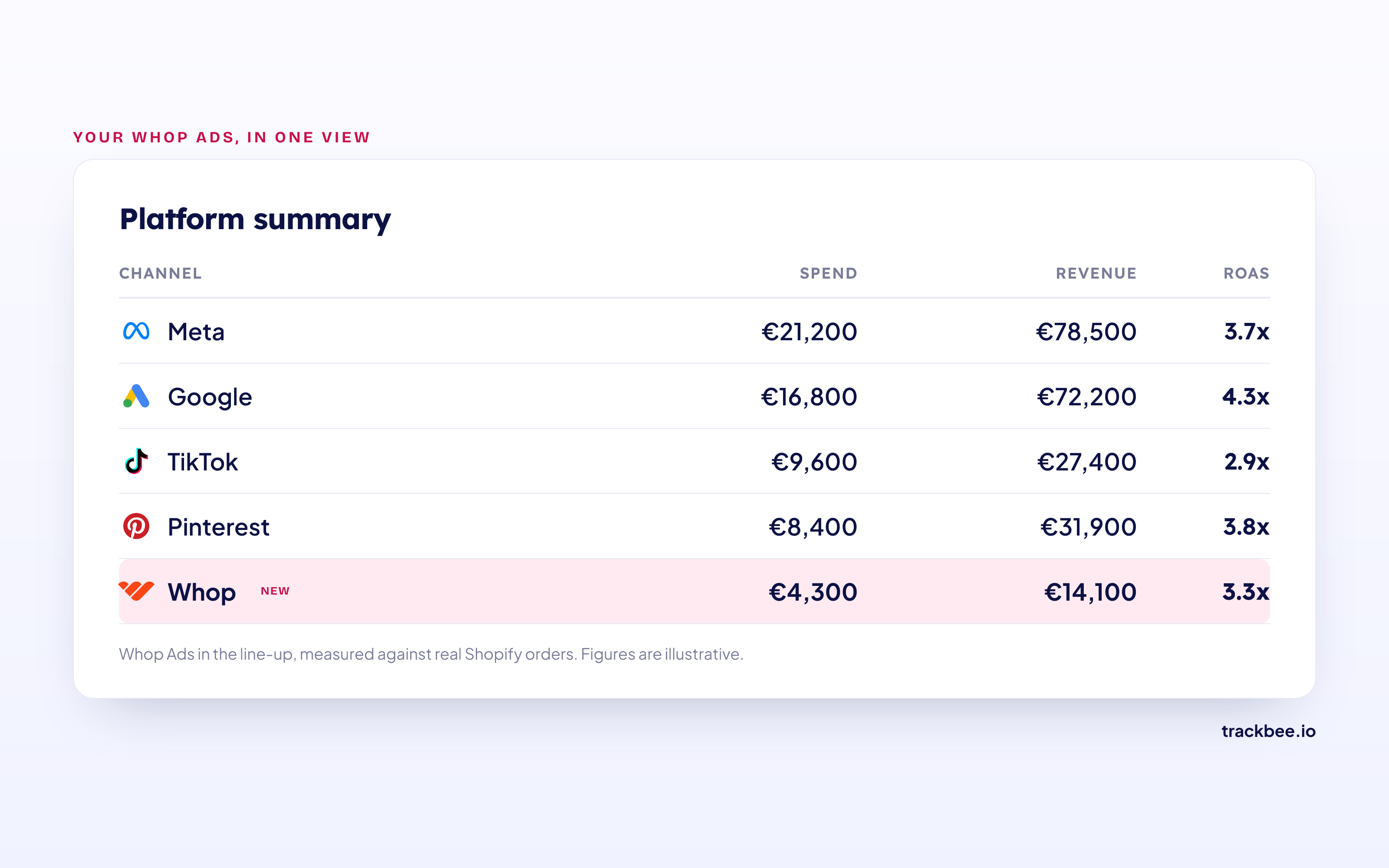
Platform summary in TrackBee with Whop Ads next to Meta, Google, TikTok and Pinterest. Figures are illustrative.

Why Measure Whop Ads Independently

Every ad platform reports on its own performance. That is normal, but it means the platform selling you the ads is also the one telling you how well they worked. Whop has its own reporting built in, and it is useful for running campaigns day to day.

What it cannot give you is an outside read. TrackBee measures your Whop Ads against the real orders in your Shopify store, the same way it measures every other channel. So instead of taking one platform's word for it, you get one consistent view of what each channel actually returned. Don't take anyone's word for it. Check the numbers yourself.

How TrackBee Measures Your Whop Ads

TrackBee reads your Whop Ads performance and matches it to the real orders captured with server-side tracking. That is what lets you compare Whop Ads to your other channels on the same basis: real revenue, not platform estimates.

This is measurement only. TrackBee does not touch your Whop account or your balance, and it does not send any of your Whop data to other platforms. Your campaigns keep running in Whop exactly as they are.

(For the other channels you actively track with TrackBee, like Meta, Google, TikTok and Pinterest, TrackBee does more than measure. That is a separate part of the product and not what this integration is about.)

Whop Ads Next to Your Other Channels

The point of bringing Whop Ads into TrackBee is the comparison. In one view you can line up your Whop Ads ROAS against Meta, Google, TikTok and Pinterest, with your GA4 and Klaviyo data alongside. Because everything is measured against the same Shopify orders, the numbers are comparable. You can see which channel is really pulling its weight and where your next euro is best spent.

Setup: No Developer Needed

Getting started takes a few minutes and no code.

  1. Connect your Shopify store to TrackBee.
  2. Connect your Whop Ads account.
  3. See your Whop Ads results in your dashboard, next to every other channel.

No data layer, no tags to maintain. If you want the background on how the measurement works, see our guide to server-side tracking.

Frequently Asked Questions

Does TrackBee Replace Whop's Own Reporting?

No. Whop's reporting is great for running your campaigns. TrackBee is the independent check that measures those campaigns against your real Shopify orders, next to every other channel.

Do I Need Shopify to Use This?

Yes. TrackBee is built for Shopify, so the Whop Ads integration measures your ads against your Shopify orders.

Does TrackBee Touch My Whop Account or Balance?

No. TrackBee only reads your Whop Ads performance to show it in your dashboard. It never changes anything in Whop and never moves money.

Will I See Different Numbers Than in Whop?

You can. TrackBee measures against the real orders in your store, so its view can differ from a platform's self-reported numbers. That difference is the whole point of an independent measurement.

Is TrackBee the Only Way to Measure Whop Ads?

No. Whop has native reporting, and other tools attribute ad performance too. TrackBee is the independent, official measurement partner that puts Whop Ads next to all your other channels on one consistent basis.

Key Takeaways

  • Whop Ads now works with TrackBee, measured against your real Shopify orders.
  • You see spend, clicks, CPC, ROAS and revenue from Whop Ads next to Meta, Google, TikTok and Pinterest.
  • The scope is measurement only. TrackBee does not touch Whop or send your Whop data anywhere.
  • Setup takes minutes and needs no developer.

Want to see what your Whop Ads really made? Start a free trial or book a free demo. More on the Whop Ads integration.

In this article
Boost Your Revenue
Track Missing Conversion Data
Lorem Ipsum

Boost Your Revenue

Track & Enrich
Missing Conversion Data

Try for free
Share this:

TrackBee is the official measurement partner for Whop Ads. If you run Whop Ads for your Shopify store, you can finally see what they actually brought in: spend, clicks, CPC, ROAS and revenue, sitting right next to Meta, Google, TikTok and Pinterest. And it's all measured against your real Shopify orders, by an independent partner instead of the platform running the ads.

Short answer: The TrackBee Whop Ads integration pulls your Whop Ads performance into TrackBee and measures it against your real Shopify orders. As the official measurement partner for Whop Ads, TrackBee shows spend, CPC, ROAS and revenue from Whop Ads next to every other channel you run, in one view. It measures the results, it does not run your campaigns or change anything inside Whop.

What You See in TrackBee for Whop Ads

Once you connect Whop Ads, it shows up as another channel in your TrackBee dashboard. For your Whop Ads you get spend, clicks, CPC, ROAS and revenue, all measured against the real orders in your store. It sits in the same platform view as the rest of your channels, so you read Whop Ads the same way you read Meta or Google.

Platform summary in TrackBee with Whop Ads next to Meta, Google, TikTok and Pinterest. Figures are illustrative.

Why Measure Whop Ads Independently

Every ad platform reports on its own performance. That is normal, but it means the platform selling you the ads is also the one telling you how well they worked. Whop has its own reporting built in, and it is useful for running campaigns day to day.

What it cannot give you is an outside read. TrackBee measures your Whop Ads against the real orders in your Shopify store, the same way it measures every other channel. So instead of taking one platform's word for it, you get one consistent view of what each channel actually returned. Don't take anyone's word for it. Check the numbers yourself.

How TrackBee Measures Your Whop Ads

TrackBee reads your Whop Ads performance and matches it to the real orders captured with server-side tracking. That is what lets you compare Whop Ads to your other channels on the same basis: real revenue, not platform estimates.

This is measurement only. TrackBee does not touch your Whop account or your balance, and it does not send any of your Whop data to other platforms. Your campaigns keep running in Whop exactly as they are.

(For the other channels you actively track with TrackBee, like Meta, Google, TikTok and Pinterest, TrackBee does more than measure. That is a separate part of the product and not what this integration is about.)

Whop Ads Next to Your Other Channels

The point of bringing Whop Ads into TrackBee is the comparison. In one view you can line up your Whop Ads ROAS against Meta, Google, TikTok and Pinterest, with your GA4 and Klaviyo data alongside. Because everything is measured against the same Shopify orders, the numbers are comparable. You can see which channel is really pulling its weight and where your next euro is best spent.

Setup: No Developer Needed

Getting started takes a few minutes and no code.

  1. Connect your Shopify store to TrackBee.
  2. Connect your Whop Ads account.
  3. See your Whop Ads results in your dashboard, next to every other channel.

No data layer, no tags to maintain. If you want the background on how the measurement works, see our guide to server-side tracking.

Frequently Asked Questions

Does TrackBee Replace Whop's Own Reporting?

No. Whop's reporting is great for running your campaigns. TrackBee is the independent check that measures those campaigns against your real Shopify orders, next to every other channel.

Do I Need Shopify to Use This?

Yes. TrackBee is built for Shopify, so the Whop Ads integration measures your ads against your Shopify orders.

Does TrackBee Touch My Whop Account or Balance?

No. TrackBee only reads your Whop Ads performance to show it in your dashboard. It never changes anything in Whop and never moves money.

Will I See Different Numbers Than in Whop?

You can. TrackBee measures against the real orders in your store, so its view can differ from a platform's self-reported numbers. That difference is the whole point of an independent measurement.

Is TrackBee the Only Way to Measure Whop Ads?

No. Whop has native reporting, and other tools attribute ad performance too. TrackBee is the independent, official measurement partner that puts Whop Ads next to all your other channels on one consistent basis.

Key Takeaways

  • Whop Ads now works with TrackBee, measured against your real Shopify orders.
  • You see spend, clicks, CPC, ROAS and revenue from Whop Ads next to Meta, Google, TikTok and Pinterest.
  • The scope is measurement only. TrackBee does not touch Whop or send your Whop data anywhere.
  • Setup takes minutes and needs no developer.

Want to see what your Whop Ads really made? Start a free trial or book a free demo. More on the Whop Ads integration.

Latest

Discover other Blogs

Explore our collection of informative and engaging blog posts.

Microsoft Ads (Bing) Cost in 2026: CPC, CPM & Budget Guide cost snapshot
Frank de Vos
Frank
5
min read
ChatGPT Ads Cost in 2026: What Shopify Brands Need to Know cost snapshot
Frank de Vos
Frank
5
min read
Pinterest Ads Cost in 2026: CPC, CPM & Budget Guide cost snapshot
Frank de Vos
Frank
6
min read
